
By AI Peak Biz Team · September 6, 2026
5 Registration Mistakes That Block A2P 10DLC for US Service Businesses

Yes, if you send application to person SMS to US phone numbers from a 10-digit long code, you must register a Brand and a Campaign through your messaging provider before sending. You will need your EIN, a public website, sample messages with opt-out language, and proof of opt-in. Log in to your Messaging Service Provider (MSP) or CSP dashboard and start there, not with The Campaign Registry directly.
TL;DR:
- Register your brand with exact business details, including legal name from IRS records, a physical address, and a public privacy policy website.
- Submit specific sample messages with clear opt-in and opt-out language, accurately reflecting your actual messaging content.
- Complete registration through your messaging provider's dashboard, choosing the correct business type and attaching approved numbers after review.
- Expect approval times from a few days for brand registration to several weeks for campaign approval, with higher vetting scores allowing increased messaging volume.
- Address common rejections by verifying legal name accuracy, providing detailed campaign descriptions, and ensuring sample messages match live communications.
Table of Contents
- What A2P 10DLC Registration Actually Requires
- Who Has to Register, and Where You Actually File
- Brand Registration: Your Pre-Submission Checklist
- Campaign Registration: Sample Messages That Pass Review
- What Registration Costs and How Long It Takes
- Why Registrations Get Rejected, and How to Fix Them
- After Approval: Linking Numbers and Staying Compliant
- Protecting Customer Data Through the Registration Process
- Author Perspective: Three Lessons From Onboarding Service Businesses
- How AI Peak Biz Keeps the Phones Answered While You Register
- Bookmark These Before You Register
- Sources
What A2P 10DLC Registration Actually Requires
A2P 10DLC stands for application to person messaging on 10-digit long code numbers, the same ten-digit numbers your business already uses for calls. Every text your booking software, CRM, or marketing platform sends to a customer counts as application to person traffic, and carriers now require that traffic to pass through The Campaign Registry (TCR), the centralized hub that verifies who's sending and why.
Skip registration and carriers will filter or block your messages outright. Twilio's own compliance documentation confirms that unregistered A2P traffic gets flagged, and your vetting score directly shapes how many messages you can send before hitting a wall.
This affects nearly every kind of business text you send:
- Appointment reminders for a plumbing or HVAC service call
- Promotional offers or seasonal discounts
- One-time passcodes (OTP) for account verification or booking confirmations
The rules trace back to two sources: CTIA, the wireless industry group that sets messaging best practices carriers enforce, and the FCC's TCPA rules, which govern consent separately from carrier registration. Both matter, and neither substitutes for the other.
Who Has to Register, and Where You Actually File
Nearly every business texting US customers from a 10-digit number needs to register, whether you are a solo contractor or a 200-location franchise. The requirements shift slightly by business type:
- Sole proprietors register under a simplified track that includes phone verification instead of a full EIN lookup, but face lower daily sending limits.
- ISVs (independent software vendors) reselling texting tools to other businesses register differently than a business texting its own customers.
- Direct brands (most local service businesses) register their own identity and campaigns.
Here's the part that trips people up most: you cannot register directly with TCR. Registration flows exclusively through your CSP or MSP portal, meaning whatever texting platform, CRM, or Twilio-based tool you use. When you start the process, that dashboard will ask you to select a customer type. Pick the one matching your actual business structure. Picking the wrong one is a common reason registrations stall.
Brand Registration: Your Pre-Submission Checklist
Brand registration verifies your business identity, and it fails most often on small mismatches. Twilio's documentation walks through the exact sequence: create a compliance profile, register the brand, register the campaign, then attach a number once everything clears.
Before you touch the form, gather these:
- Your legal company name exactly as it appears on your EIN paperwork. The IRS's EIN application process is the authoritative record, and even a missing "LLC" or a comma difference can trigger a mismatch flag.
- A physical business address, not a P.O. box.
- A live, publicly accessible website with a visible privacy policy; consider consulting West Michigan Small Business Marketing if you need help publishing business details on your site. Reviewers check this manually in many cases.
- Screenshots or archived proof of how customers opt in to texts, whether that's a web form, a checkbox, or a signed intake sheet.
Sole proprietors follow a different path: instead of an EIN check, you verify a mobile number through a one-time passcode (OTP), and you'll face lower throughput limits and association caps compared to registered corporations.
Pro Tip: Save a dated screenshot of your opt-in form the same day you register. If a reviewer questions your consent method six months later, you'll have proof instead of a promise.
Campaign Registration: Sample Messages That Pass Review
Campaign registration is where you describe what you actually send and how customers agreed to receive it. This is also where vague answers cause the most rejections. Twilio's own guidance notes that specific sample messages with exact opt-in mechanics cut down review cycles significantly compared to generic descriptions.
Fill in the use case (marketing, appointment reminders, two-factor authentication), the sub-type, expected message frequency, and whether your texts include links. Every sample message needs opt-out language built in, since CTIA's messaging principles treat "Reply STOP to unsubscribe" as a baseline requirement, not a nice-to-have.
Here's what compliant samples look like in practice:
- Appointment reminder: "Hi [Name], this is [Business] confirming your appointment on [Date] at [Time]. Reply STOP to opt out, HELP for help. Msg & data rates may apply."
- Marketing: "[Business]: Save 15% on your next service this week only. Reply STOP to unsubscribe."
- OTP: "[Business] verification code: 123456. Do not share this code. Msg & data rates may apply."
Document opt-in with a screenshot of your web form, the checkbox language customers see, or a written script your staff reads during in-person or phone signups.
Pro Tip: Match your sample messages word for word to what you actually send. Reviewers cross-check submitted samples against live traffic, and drift between the two is a fast way to get flagged later.
What Registration Costs and How Long It Takes
Fees and timelines vary by provider, but the pattern holds across the industry. Brand registration usually carries a one-time vetting fee, and most campaigns carry a small recurring monthly charge on top of your regular messaging costs. Expect these to differ depending on which MSP or CSP you use.
Timing splits into two stages:
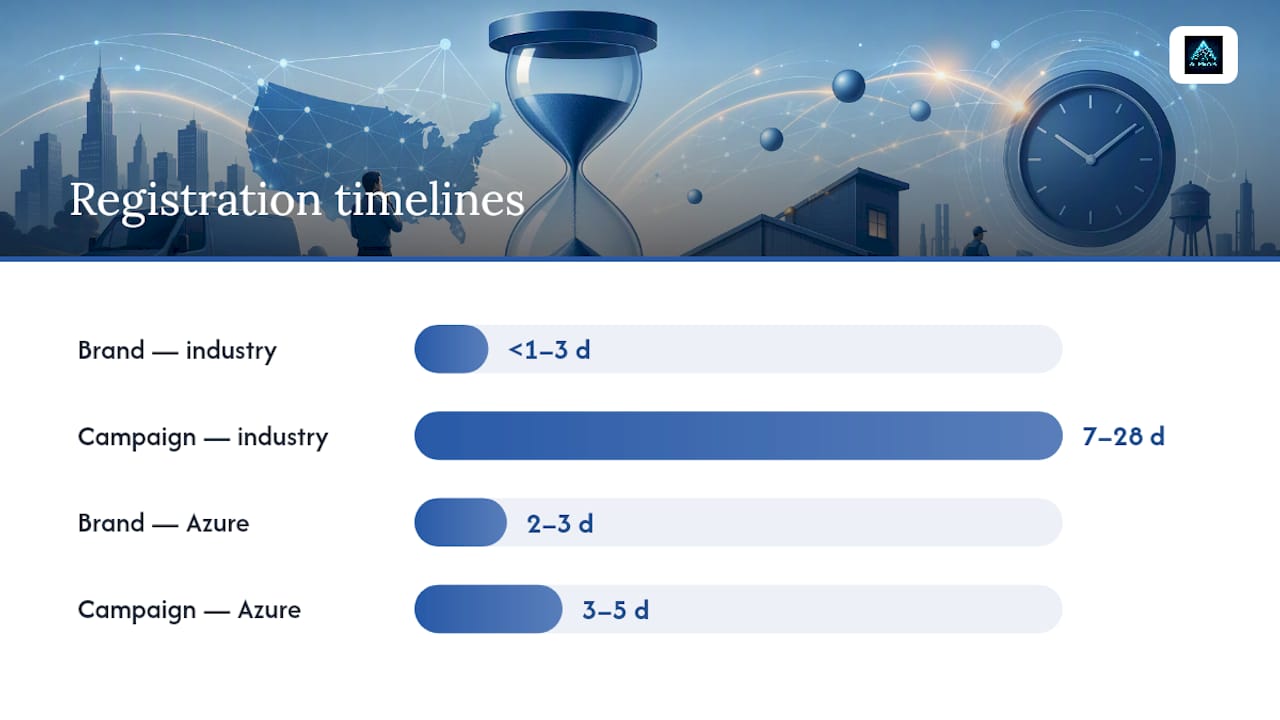
- Brand review: often automated, resolving in minutes to a few days.
- Campaign review: ranges from about one to four weeks, depending on submission completeness and provider backlog.
Azure Communication Services quotes similarly tight windows: brand approval typically lands in two to three business days, with campaign approval following in another three to five.
Your vetting score, generated during this process, directly determines your daily sending throughput. Thin documentation earns a lower score and a lower ceiling. Complete, consistent documentation tends to clear faster and unlock higher limits from day one.
Why Registrations Get Rejected, and How to Fix Them
Most rejections trace back to five recurring mistakes, and each has a specific fix:
- EIN or legal name mismatch. Pull your exact name from IRS records and retype it precisely, including punctuation and suffixes.
- Vague campaign description. Rewrite it with specifics: what you send, how often, and to whom, rather than "customer notifications."
- Missing opt-out language. Add "Reply STOP to unsubscribe" to every sample message before resubmitting.
- Nonpublic or incomplete website. Publish a live privacy policy page and confirm it loads without a login wall.
- Inconsistent samples. Make sure the messages you submit match what your platform actually sends, word for word.
If a rejection reason isn't clear from the notice, escalate to your MSP or CSP's support team directly. They can often see the reviewer's specific flag even when the automated message is generic.
After Approval: Linking Numbers and Staying Compliant
Once your campaign clears, your provider's dashboard lets you assign or link your 10-digit number to the approved campaign, usually a dropdown selection rather than a new application.
From there, watch two things closely: your opt-out rate and any spam complaints. Carriers throttle or suspend campaigns that cross complaint thresholds, even after approval. If your business name, website, or the way you use text messaging changes, you have to update your registration to match. An outdated brand profile is treated the same as a mismatched one during audits.
Protecting Customer Data Through the Registration Process
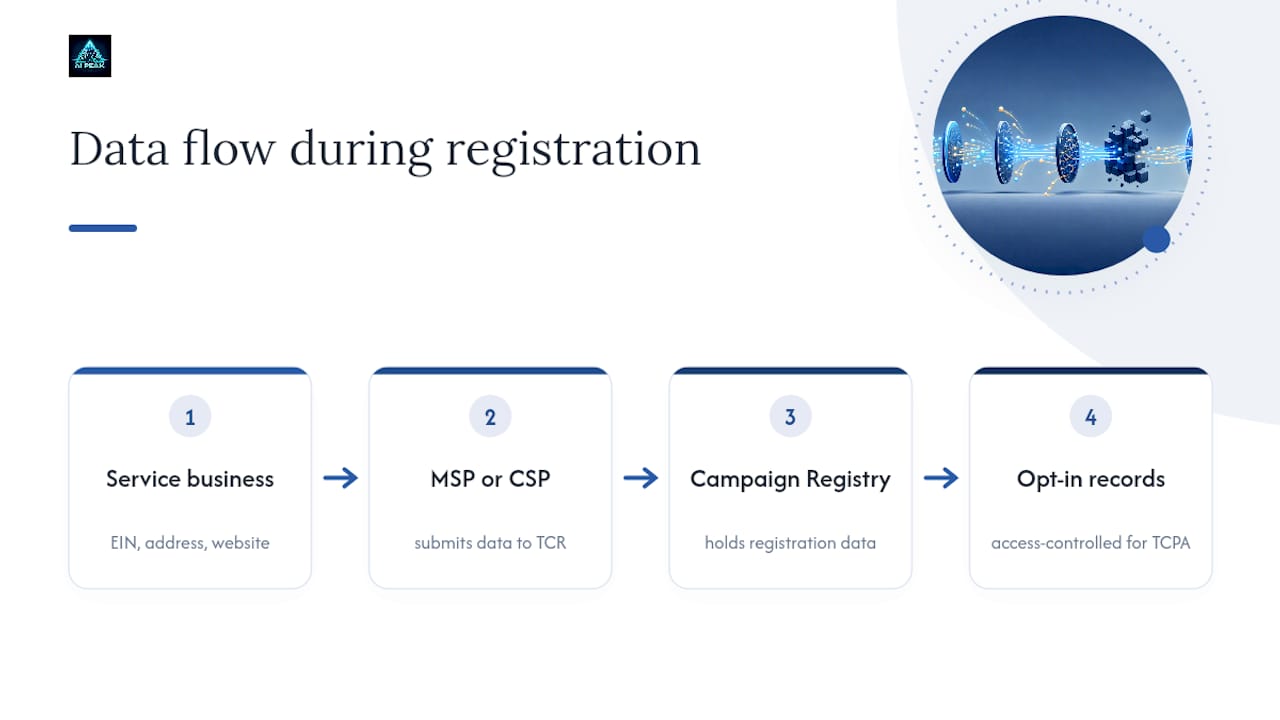
Registering a Brand means handing your EIN, business address, and website details to a third party (your MSP or CSP) that then submits it to TCR. That's a meaningful amount of sensitive information moving through a chain of hands, and it deserves the same scrutiny you'd give any vendor holding your tax ID.
Before submitting, confirm your MSP or CSP has a clear data handling policy and doesn't resell or expose your business identifiers. Ask directly if you can't find it published. This matters doubly for regulated industries. A medical practice registering a campaign, for instance, has to think about how sample messages and opt-in records intersect with patient privacy obligations, not just carrier rules.
On the consumer side, your opt-in records themselves are sensitive. A screenshot of a customer's phone number, name, and signed consent is personal data, and it should live somewhere access-controlled, not in a shared drive open to your whole team. Store proof of consent the way you'd store payroll records: retained for compliance, but locked down.
Finally, remember TCPA consent and carrier registration solve different problems. Registering your campaign satisfies the carriers. It does not, on its own, satisfy your legal obligation to document valid consent under TCPA rules. Keep both records separately, and keep both current.
Author Perspective: Three Lessons From Onboarding Service Businesses
The two mistakes I see most: businesses typing their legal name from memory instead of copying it straight from IRS paperwork, and businesses writing campaign descriptions so generic that reviewers can't tell what's actually being sent. Both are avoidable with five extra minutes of preparation.
My working checklist before anyone submits: EIN paperwork open on screen, live website confirmed loading, opt-in proof screenshotted, and sample messages copied verbatim from what the platform will actually send. Loop in your MSP or CSP early. They've seen every rejection reason already, and they'd rather catch it before submission than after.
How AI Peak Biz Keeps the Phones Answered While You Register
AI Peak Biz doesn't replace your 10DLC paperwork, but it solves the problem that's usually costing you more money while that paperwork sits in review: missed calls and slow replies. Our AI voice agent (Ascent plan) can answer calls and book appointments by phone, day or night, and missed-call text back (Summit plan) can reply within moments, so a customer is less likely to go to a competitor just because your compliance queue is backed up.
If part of your registration checklist involves proving you have a public, working website (a requirement carriers actually check), AI Peak Biz's website design service can get that live fast. And once your texting campaign is approved, our AI chatbot picks up the multichannel conversations your customers are already trying to have with you, whether that's SMS, web chat, or your Google Business Profile.
Bookmark These Before You Register
Start with Twilio's A2P 10DLC documentation for step sequencing, TCR's overview for ecosystem context, and the IRS EIN portal if you still need a tax ID. Save all three for future updates.
Sources
- A2P 10DLC documentation, Twilio
- The Campaign Registry: Intro (TCR)
- Apply for ten-digit long code (Azure Communication Services)
- Rules and regulations implementing the Telephone Consumer Protection Act, FCC
Recommended
- AI Revenue Recovery for Service Businesses: The Complete Guide