
By AI Peak Biz Team · October 5, 2026
Assign Conversations with AI Triage: Manager Playbook, Daily Cadence

Balanced, workload-aware assignment with clear capacity limits and a fallback plan is the default setup we recommend for any support team. It gets first responses out faster and keeps conversations from piling up unassigned while nobody notices. The checklist below walks through exactly how to build it inside your platform, step by step.
TL;DR:
- Support teams should implement workload-aware routing with capacity limits and fallback plans to prevent overloads and reduce SLA breaches.
- Regularly test routing rules in staging environments and monitor key metrics like time-to-first-response and unassigned queue depth to ensure effectiveness.
- Using AI assistants for qualification and booking can significantly lower manual triage, leading to faster, more efficient first responses.
- Setting daily protocols for queue audits, capacity checks, and reassignments helps maintain reliability and prevents unnoticed backlog growth.
- Balanced routing outperforms round robin by considering agent capacity, especially as team size and workload increase.
Table of Contents
- Manual queues, round robin, or balanced routing: which one fits?
- Setup checklist: capacities, routing order, fallbacks, and testing
- Runbooks for overflow, off-hours, and empty queues
- Key metrics and alerts to monitor assignment health
- How AI-assisted qualification reduces the manual load
- A manager's daily cadence for keeping assignment honest
- Where AI Peak Biz fits into this playbook
- Sources
Manual queues, round robin, or balanced routing: which one fits?
Most collaborative platforms offer three ways to hand conversations to your team, and picking the wrong one for your situation is where a lot of support backlogs start.
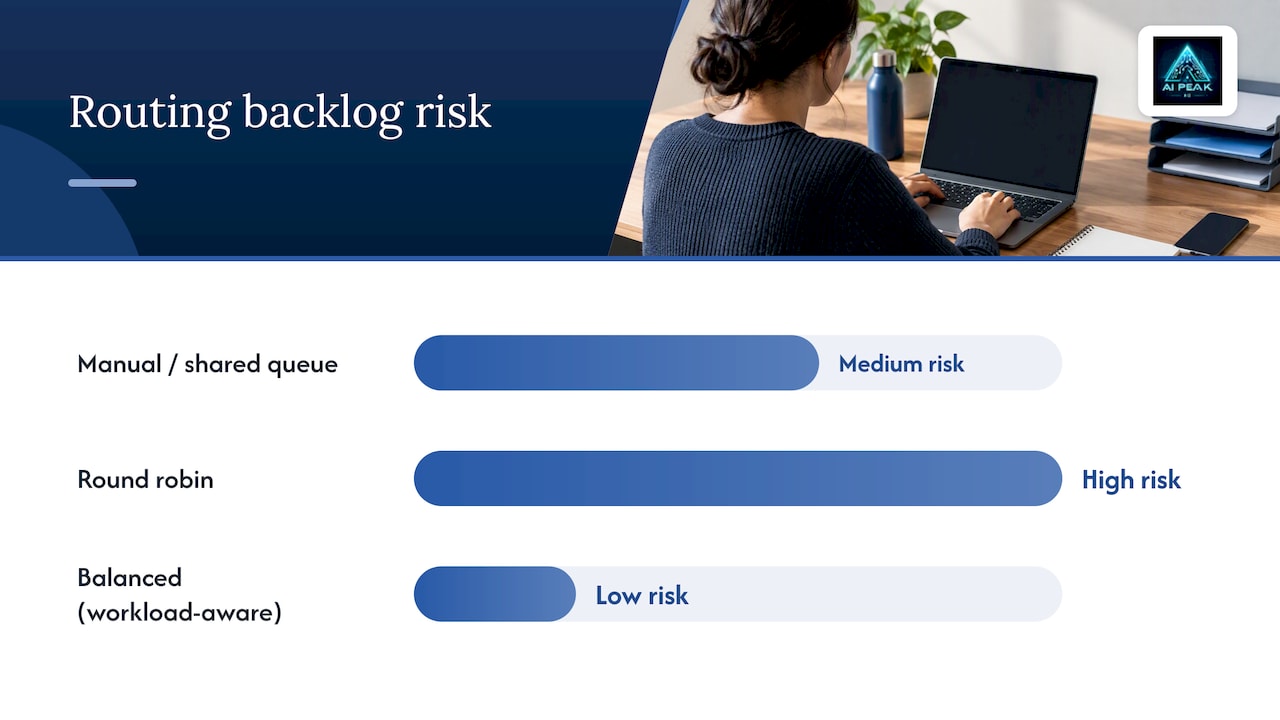
A manual or shared queue works when a small team just pulls conversations as they go. It fits ad hoc handoffs and teams of two or three where everyone can see everything, but it breaks down fast once volume grows, because nobody owns the queue and conversations sit untouched.
Round robin assigns conversations in sequence regardless of who is already buried. Sales teams like it because it distributes leads evenly, but for support, round robin ignores capacity entirely and can stack new conversations on an agent who already has ten open, while a teammate with none waits for the next turn.
Balanced or workload-aware routing checks each teammate's current load before assigning, which is why balanced assignment is widely recommended for support teams while round robin tends to stay popular for sales.
- A high-volume support line with five agents sees fewer SLA breaches under balanced routing because no single agent gets overloaded.
- A low-volume team of two can often run on a simple manual queue until ticket volume justifies automation.
Setup checklist: capacities, routing order, fallbacks, and testing
Building balanced assignment is mostly a matter of setting the right rules once and testing them before you trust them with live traffic.
- Set per-agent capacity limits. Decide how many active conversations each teammate can carry at once, and define availability signals such as online, away, or on-call so the system knows who is actually reachable.
- Build the routing order. Route first to a primary owner if one exists, then run a capacity check, then fall back to the wider team, and finally escalate to an on-call teammate if nobody is available.
- Add required metadata. Tag conversations with priority and topic fields so reassignment later takes seconds instead of a manual investigation.
- Test in a staging queue first. Run the rules against simulated or low-stakes traffic for about a week, watch assignment latency and unassigned queue depth, and adjust capacity numbers before rolling out team-wide.
Balanced routing only works when it can tell who is actually free, as explained in this article on scaling your brokerage with AI. Microsoft's guidance on configuring participant limits points to a core distinction: round robin loops through teammates without checking load, while balanced routing enforces a capacity threshold so no one gets buried before the next person gets a turn.
Pro Tip: Start with conservative capacity limits and loosen them gradually. It's easier to raise a cap than to explain to an agent why they suddenly have fifteen open chats.
Runbooks for overflow, off-hours, and empty queues
Even a well-built routing system needs a plan for what happens when it can't find anyone to assign to.
- Overflow policy: if a conversation sits unassigned past a set number of minutes, escalate it to on-call staff or flag it with a high-priority marker so it can't get buried.
- Off-hours handling: pair an after-hours call handling auto-response with capture and booking tools, so inbound leads still get qualified and scheduled overnight instead of waiting until morning.
- Staffing audits: regularly check for empty or disabled team inboxes and removed teammates, since automated routing can only assign to eligible recipients and queues fill up fast when that list is wrong.
- Bulk reassignment: when a backlog builds, tag conversations by SLA urgency first, then reassign in priority order rather than clearing the queue top to bottom.
Treat overflow and off-hours as their own flows with their own rules, not an afterthought bolted onto daytime routing.
Key metrics and alerts to monitor assignment health
A handful of numbers tell you whether your assignment setup is actually working.
Track time-to-first-response, assignment latency (how long a conversation sits before it reaches a person), unassigned queue depth, and per-agent load against the capacity limits you set. Build alerts around sample thresholds, such as flagging any conversation unassigned for more than 15 minutes or any agent sitting at full capacity for over an hour, and route those alerts to an automated escalation rather than hoping someone notices.
Balanced routing checks capacity before assigning, which is the mechanism behind fewer SLA breaches than a pure round-robin setup produces, since round robin has no way to skip an overloaded teammate.
Review the dashboard weekly, not just when something breaks. Watch capacity trends over time so you catch a slow drift toward overload before it becomes a backlog.
How AI-assisted qualification reduces the manual load
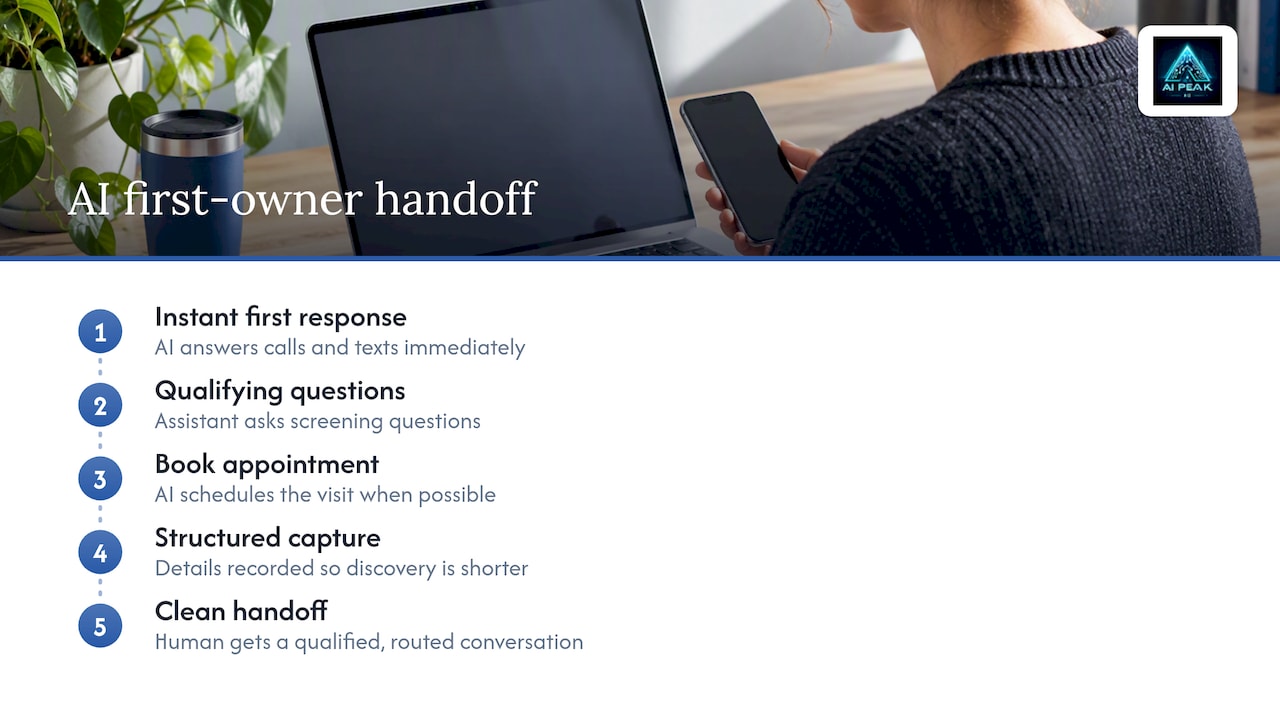
A lot of the assignment problem disappears before a human ever touches the conversation, if the first response is handled well.
An AI voice agent that picks up calls your team misses and asks your qualifying questions can act as a first owner for the conversation. By the time it reaches a human teammate, the lead is already qualified and the details are already captured, which shortens the discovery step that normally eats up the first few minutes of a handoff. A unified inbox pulling in SMS, web chat, and social messages means that first-owner role applies no matter which channel the customer used to reach out.
Using AI to qualify and book reduces manual triage, so the human agent receives a conversation that's already moved partway down the routing order.
This maps directly onto the checklist above: instant first response, structured capture, and a clean handoff to the on-call or primary owner when a human is needed.
A manager's daily cadence for keeping assignment honest
We've found the system only stays reliable with a short daily rhythm: a morning audit of the unassigned queue and any overnight alerts, a midday capacity check across the team, and an evening pass to reassign anything that slipped through.
Three rules of thumb help with the judgment calls: pause automation when queue data looks wrong rather than let it misroute, add capacity before an agent hits their ceiling rather than after, and escalate the moment a conversation crosses its SLA line. Pilot this for one week and measure the difference.
Where AI Peak Biz fits into this playbook
We built our platform around the same problem this guide addresses: conversations that sit too long before anyone owns them. An AI voice agent can answer calls and book appointments by phone, and missed-call text back can reply within moments, so fewer conversations reach your team queue unassigned and uncaptured in the first place.
- Instant AI call and text response acts as a first-response layer before manual routing even starts.
- A unified inbox brings SMS, web chat, email, Facebook Messenger, Instagram, and Google Business Profile messages into one place, so capacity checks cover every channel, not just one.
- Built-in CRM and pipeline tracking give you the audit trail this guide recommends, without stitching together separate tools.
Sources
- Chat with others in Microsoft Teams | Microsoft Support
- How to configure a limit on the number of users in… (Microsoft Answers)
Recommended
FAQ
What does "team chat" mean?
Team chat refers to internal messaging between coworkers, used for coordination and quick questions, as distinct from customer-facing conversations that need formal assignment. Microsoft Teams supports named group chats with up to 250 participants and preserves chat history when members are added. Internal chat tools are not a substitute for a conversation assignment system handling customer inquiries.
How do I communicate with my team about conversation ownership?
Set clear routing rules first, then use a shared dashboard or status indicator so everyone can see who owns which conversation at a glance. Pair that with a brief daily check-in covering the unassigned queue and any capacity alerts from overnight.
How do I start a conversation with a group of people?
In most team messaging platforms, you create a new group chat, add participants by name or email, and give the chat a title so it's easy to find later. Microsoft Teams lets you choose how much prior history new members can see when they join an existing group chat.
How do I create a group chat in Microsoft Teams?
Select the new chat icon, add the names of the people you want to include, and give the conversation a name once more than two participants are added. Teams preserves the group's chat history going forward, and you control what history new members see when they're added later.
What is the difference between round robin and balanced assignment?
Round robin assigns conversations in sequence without checking whether a teammate is already overloaded, which works fine for evenly sized sales leads but can bury a support agent. Balanced assignment checks each teammate's active conversation count against a set capacity limit before routing, which is why support teams tend to rely on it more.