
By AI Peak Biz Team · October 10, 2026
Filter Spam Leads in 3 Layers to Keep Ad Signals Clean

The most reliable way to filter spam leads is a three-layer approach: score and challenge suspicious traffic at the edge, back up your forms with low-friction defenses like reCAPTCHA v3 and honeypots, then catch what slips through using CRM automation. Do this hour: turn on reCAPTCHA v3 in monitoring mode, add a honeypot field to your highest-traffic form, and start watching for low bot scores, disposable email domains, and repeated IPs. Those three signals catch most junk before it ever reaches a salesperson.
TL;DR:
- Run reCAPTCHA v3 in monitoring mode first, then set thresholds from observed scores; during the first month, review flagged leads before blocking.
- Use managed edge challenges, rate limits on form POST requests, and header checks to catch bots that bypass JavaScript; allowlist verified crawlers and internal IP ranges.
- Route suspicious records into a CRM spam list, deduplicate by email, phone, and name patterns, and have someone review the list weekly before deletion.
- Send only verified or sales approved leads to ad platforms as conversions; raw submissions can train bidding algorithms to seek more low quality traffic.
Table of Contents
- Why Spam Leads Are Getting Worse and How That Breaks Your Data
- Signals That Reveal Spam Leads and Quick Diagnostic Tests
- Form Hardening: reCAPTCHA v3, Honeypots, Multi-Step Flows, and Verification
- Edge and WAF Controls and Bot Management Examples
- CRM Automation: Tagging, Spam Lists, Dedupe, and Safe-Delete Workflows
- What to Track and How to Keep Bidding Signals Clean
- A Practical Weekly Checklist and Prioritization
- How We Help You Cut Lead Noise and Recover Lost Revenue
- Sources
Why Spam Leads Are Getting Worse and How That Breaks Your Data
Spam has gotten harder to catch because the tools behind it have gotten smarter. AI-driven bots now mimic human typing patterns and mouse movement, and some skip the browser entirely, firing headless POST requests straight at your form endpoint where client-side checks never even see them. Cloudflare's guidance on form protection notes that these direct POST attacks bypass JavaScript validation completely, which is why relying on front-end checks alone leaves a wide-open door.
Paid traffic adds its own mess. Click farms, competitor submissions, and poorly targeted campaigns all generate leads that look real on the surface but go nowhere.
The damage compounds fast:
- Inflated lead counts make campaigns look more productive than they are.
- Corrupted bidding signals teach ad platforms to chase the wrong audience.
- Sales teams waste hours chasing contacts that were never going to buy.
Once bad data enters your funnel, every report built on top of it inherits the noise.
Signals That Reveal Spam Leads and Quick Diagnostic Tests
Spam leaves fingerprints at three levels: the form, the request, and the CRM. Checking all three gives you a far more accurate read than eyeballing a name field alone.
Form-level signals include gibberish text in name or message fields, email domains that look freshly registered or disposable, the same IP submitting multiple times in a short window, and UTM combinations that make no logical sense, like a "Facebook ad" source paired with a desktop-only user agent that never visits social apps.
Request-level signals show up in the technical layer: empty or missing headers, unusual or outdated user agents, low bot scores from reCAPTCHA or your edge provider, and sudden spikes in submission volume with no matching ad spend increase.
CRM-level signals appear after the fact:
- Emails that bounce immediately on your first outreach attempt.
- Phone numbers that fail verification or never connect.
- Contacts with no engagement across repeated follow-up attempts.
- Multiple records sharing the same name, phone, or email pattern with minor variations.
Pro Tip: Pull a sample of your last 100 leads and check how many fail at least two of these signals at once. That ratio becomes your baseline for measuring improvement later.
Form Hardening: reCAPTCHA v3, Honeypots, Multi-Step Flows, and Verification
Your form is the first checkpoint, and it is also where you have the most control without adding friction for real visitors.
- Run reCAPTCHA v3 in monitoring mode first. Google's documentation explains that the system returns a score between 0.0 and 1.0, where scores closer to 1.0 indicate likely human behavior. Start by logging scores without blocking anything, review the distribution in the admin console, then set a suitable threshold and take variable actions based on context rather than hard blocking everyone below it.
- Use action names to segment scoring. A contact form and a login page behave differently, and naming your actions lets you analyze each one separately for sharper tuning.
- Add an invisible honeypot field. A hidden input that real visitors never see but bots fill in automatically is one of the simplest, lowest-friction filters you can deploy, and it works well alongside reCAPTCHA rather than instead of it.
- Consider multi-step forms for high-value offers. Splitting a form into two or three steps filters out low-effort bot submissions, since most scripted attacks are built to fill a single-page form in one pass.
- Weigh email verification against OTP phone verification. Email verification is lightweight and works well for general inquiries; OTP phone verification adds friction but is worth it for high-ticket leads where a single fake contact wastes significant sales time.
- Strip unnecessary free-text fields. Every open text box is an invitation for spam content. Replace optional comment fields with dropdowns or checkboxes wherever the information can be structured.
Pro Tip: Never block on reCAPTCHA score alone during your first month. Pair it with a human review of flagged submissions so you catch real customers who happen to score low on a shared or corporate network.
Edge and WAF Controls and Bot Management Examples
Form-level defenses stop a lot, but some traffic needs to be filtered before it even reaches your site. That is the job of edge and web application firewall controls.
Cloudflare's bot management approach separates detection from mitigation, which matters because you want visibility before you start blocking anything.
- Start with Managed Challenge, not an outright block, for traffic flagged as likely automated.
- Rate-limit POST requests to your form endpoints, and pair that with header checks to catch direct POST attacks that skip your JavaScript entirely.
- Allowlist verified search engine bots and your own internal IP ranges so legitimate crawlers and your team never get caught in the net.
- Watch Security Events regularly and adjust thresholds when you spot real visitors being challenged unnecessarily.
- Track challenge solve rate and bot-score distribution over time. A rising solve rate on real users signals your rules are too aggressive; a falling one on suspicious traffic confirms they are working.
Blocking on a single signal like IP address or country is brittle and easy for attackers to route around. Combining header checks, rate limits, and bot scores gives you a far more durable filter.
CRM Automation: Tagging, Spam Lists, Dedupe, and Safe-Delete Workflows
Whatever gets past your form and edge defenses needs a last line of filtering inside your CRM, and this is where automation saves the most time.
- Build a "Spam leads" list and set automation rules that route obvious junk there automatically instead of into your main pipeline, or mark the record "Do not contact" so no rep wastes a call.
- Set up dedupe rules that match on email, phone, and name patterns to catch the same bad actor submitting slightly varied information across multiple forms.
- Block known disposable email domains at the point of entry so throwaway addresses never create a record in the first place.
- Run a repeatable review cycle. Once a week, have someone scan the spam list, confirm the classification, mass-delete confirmed junk, and note any pattern that should become a new automation rule.
- Send only sales-accepted leads to your ad platforms as conversions. This is the step most businesses skip, and it is the one with the biggest downstream impact: every raw submission you report as a conversion teaches the algorithm to find you more of the same noise.
Pro Tip: Review your spam list before deleting anything for the first month. A rule that looks airtight on paper sometimes catches a legitimate customer with an unusual name or a corporate email format you didn't account for.
What to Track and How to Keep Bidding Signals Clean
Measuring your filtering effort is what tells you whether it is actually working or just creating friction for real buyers. Track blocked submissions, your verified-leads ratio, lead-to-opportunity rate, and a false-positive rate to catch over-blocking before it costs you real business.
- Never export raw form submissions directly as conversion events. Send only validated or sales-accepted leads back to your ad platform.
- Follow Google Ads conversion upload guidance closely, since duplicate click conversions and conflicting GCLID, gbraid, or wbraid values are common upload errors that corrupt your reporting.
- A practitioner discussion on Google Ads conversion tracking confirms that gating conversions behind a "sales-accepted" status, rather than firing on raw submission, is the advanced-user standard for keeping bidding signals clean.
- Review your bot-score distribution and security event logs on a regular cadence to tune thresholds as traffic patterns shift.
A Practical Weekly Checklist and Prioritization
Here is where the pieces fit on a timeline, because tackling everything at once is how most filtering projects stall out.
This week: turn on monitoring mode for reCAPTCHA, add a honeypot field, and set up one or two basic CRM automation rules to flag obvious junk.
Within 30 days: set your reCAPTCHA threshold based on real score data, add rate limiting at the edge, and build out a proper spam list with a weekly human review process.
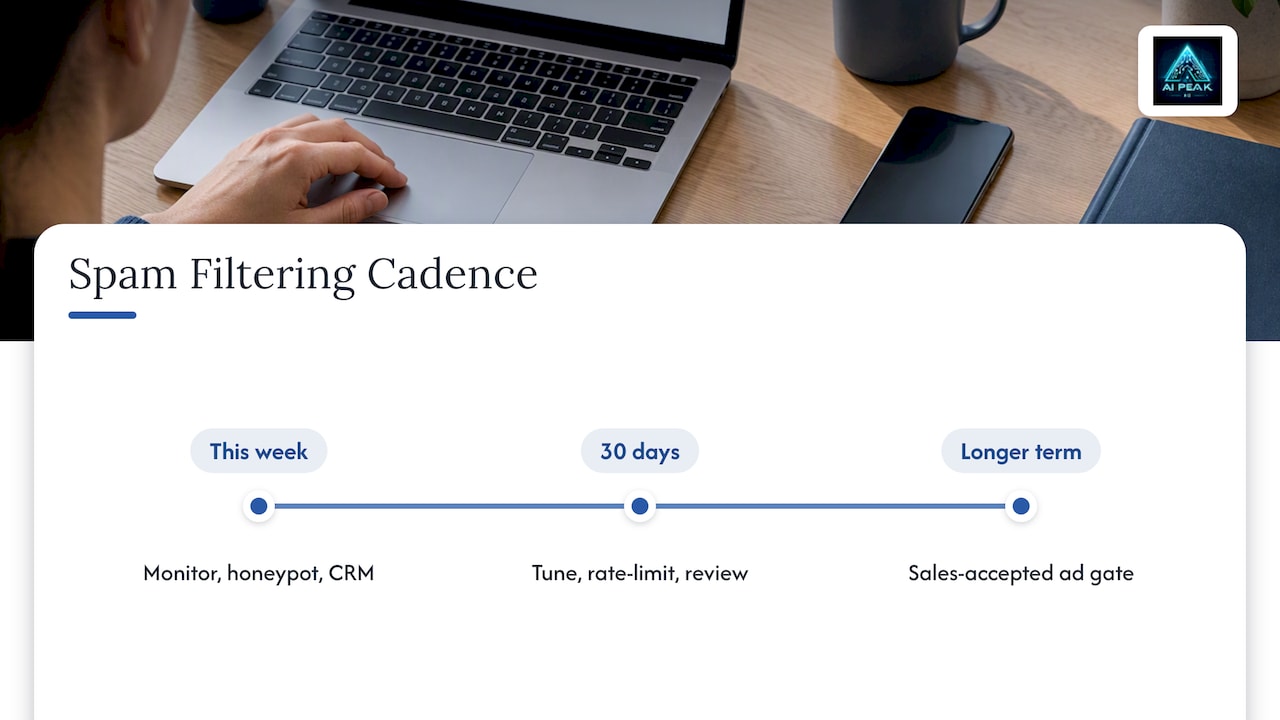
Longer term: gate every conversion sent to your ad platforms behind a sales-accepted status, not just a form submission. If your lead volume or technical complexity grows past what your team can tune manually, that is the point where a managed response and qualification system starts to make more sense than piecing together rules on your own.
Filtering spam is never a one-time setup. It is a cadence of watching, adjusting, and protecting the data that your sales team and ad accounts both depend on.
How We Help You Cut Lead Noise and Recover Lost Revenue
Spam filtering protects your data, but it does not answer your phone, and a missed call is still a missed opportunity no matter how clean your lead list looks. We built our platform to help close that second gap: on our Ascent plan, an AI voice agent can answer calls and book appointments by phone, day or night, and on Summit, missed-call text back can reply within moments, so a real prospect is less likely to sit in a queue behind the noise you just learned to filter out.
Our unified inbox consolidates multiple communication channels into one place to help prevent missed messages between tools. Plans start with AI Website at $197 per month, with Base Camp, Ascent, and Summit scaling up for businesses that want more automation and reach. If you are tired of watching good leads go cold while you sort out the bad ones, see how AI Peak Biz works and get started today.
Sources
FAQ
Is there a way to filter out spam emails?
Yes, most email providers include built-in spam filters, and you can strengthen them further with custom rules that block known disposable domains or flag suspicious sender patterns. On the lead-generation side, combining reCAPTCHA v3 with CRM-level email verification catches spam before it ever reaches an inbox.
Why am I getting hundreds of spam emails all of a sudden?
A sudden spike usually means a form on your site is being targeted by an automated bot or a scripted attack sending direct POST requests that skip your normal validation. Adding server-side rate limits and a bot management layer at the edge typically brings volume back down fast.
How do I stop receiving so many spam texts?
For business phone lines tied to lead forms, OTP or phone verification at the point of submission filters out most fake numbers before they ever reach your team. Blocking known spam number patterns and reviewing unusual submission spikes also helps isolate the source.
How do I permanently stop receiving spam emails or leads?
No single fix stops every attempt permanently, since spam tactics evolve, but a layered defense of edge-level bot scoring, form-level verification, and CRM automation keeps the volume consistently low. Regularly reviewing your Security Events and challenge solve rate lets you adjust rules as new patterns appear instead of falling behind them.
How do I avoid sending bad lead data to my ad platforms?
Only forward sales-accepted or verified conversions to your ad account rather than every raw form submission, since raw submissions teach bidding algorithms to chase noise. Google Ads documentation and guidance on lead form webhooks both outline how to structure that gating correctly and avoid duplicate conversion errors during upload.