
By AI Peak Biz Team · September 4, 2026
72 Hour HomeAdvisor Follow Up Playbook for Contractors

The moment a HomeAdvisor lead lands, send an automated acknowledgment by SMS and email promptly, then call within a few minutes. If the homeowner doesn't pick up, leave a short voicemail and drop the lead into a multi-touch sequence across text, phone, and email. That system, not the lead itself, decides whether you profit or lose money on the platform.
TL;DR:
- Responding within five minutes of a lead arriving significantly increases the chance of booking the job, as homeowners contact multiple contractors simultaneously.
- Automating immediate acknowledgment, missed-call text-backs, and using a clear SLA for outreach can help recover opportunities that would otherwise be lost.
- Tagging leads based on source, urgency, and desired service helps prioritize follow-up and improves long-term conversion tracking.
- Integrating lead notifications into a CRM and establishing a five-touch, channel-diverse sequence enhances lead engagement and reduces manual follow-up time.
- Using AI-powered call and text responders can prevent lost leads during busy times or after hours, boosting booking rates without needing an on-call technician.
Table of Contents
- Your HomeAdvisor Lead Follow Up Checklist for the Next 72 Hours
- Why Speed-to-Lead Determines Whether HomeAdvisor Pays Off
- The Follow-Up Sequence That Turns Rented Leads Into Booked Jobs
- How to Route HomeAdvisor Leads Into Your Workflow Automatically
- Which Leads Deserve a Human Call Right Now?
- What to Measure to Know If Your Follow-Up Is Working
- Common Mistakes Contractors Make Automating Follow-Up
- Why "Just Respond Fast" Isn't the Whole Answer
- Let AI Peak Biz Answer the Lead While You're on the Roof
- Sources
Your HomeAdvisor Lead Follow Up Checklist for the Next 72 Hours
Most contractors lose HomeAdvisor money on process, not price. Fixing that starts with five moves you can make before the weekend.
- Turn on missed-call text-back. If a call from a HomeAdvisor lead goes unanswered, an automatic text should go out immediately. This single fix can recover roughly 20 to 30 percent of missed-call opportunities that would otherwise vanish into voicemail purgatory.
- Route HomeAdvisor emails into your CRM. Set up an email parser or webhook so lead notifications flow straight into your CRM or job management tool instead of sitting in an inbox someone checks twice a day.
- Set two SLAs and write them down. A one-minute acknowledgment SLA for the first text or email, and a 2 to 5 minute SLA for the first phone attempt. Post them where your team sees them.
- Build a 5-touch sequence with a breakup message. Define which channel fires on which day, and write the final "should we close your file" message now, not when you're annoyed three weeks from now.
- Tag every lead by source and urgency. A tagged lead tells you six months from now which sequence, which service line, and which time of day actually converts.
Pro Tip: Build the breakup message before you build anything else. Contractors who write it last tend to let dead leads rot in the pipeline for months instead of closing the loop and moving on.
None of this requires a developer. A parsing tool, a CRM with automation rules, and a texting platform will cover steps 1 through 4 in an afternoon. Step 5 is a habit, and it's the one most shops skip.
Why Speed-to-Lead Determines Whether HomeAdvisor Pays Off
Speed is the entire game with rented leads. Contractors who respond quickly see conversion rates multiply compared with those who wait longer, because a homeowner filling out a HomeAdvisor form is usually requesting three to five quotes at once.
The math that matters: A homeowner submitting a HomeAdvisor request typically hears back from several contractors within minutes. Whoever answers first often books the estimate, regardless of price, simply because they showed up before the homeowner stopped paying attention.
That shopping behavior explains why HomeAdvisor leads feel expensive to contractors who call back the next morning. You paid the same fee as the contractor who called in three minutes. The difference in outcome isn't the lead cost. It's the gap in follow-up speed.
Marketplace trust is part of this conversation too. The FTC ordered HomeAdvisor to pay $72 million and change how it markets leads after finding deceptive practices around lead quality claims. That settlement doesn't make every lead bad, but it's a fair reminder that a purchased lead is a raw opportunity, not a guaranteed customer. You're paying for a phone number and a project description. What happens in the next five minutes is entirely on you.
A few numbers worth sitting with:
- Homeowners requesting quotes on HomeAdvisor typically contact multiple contractors in one sitting.
- The contractor who calls first usually secures the estimate slot, not the lowest bidder.
- Waiting until the next business day to follow up routinely means competing for a job that's already been scheduled with someone else.
The Follow-Up Sequence That Turns Rented Leads Into Booked Jobs
Here's a sequence you can build into almost any automation platform this week, timed from the moment the lead notification hits your system.
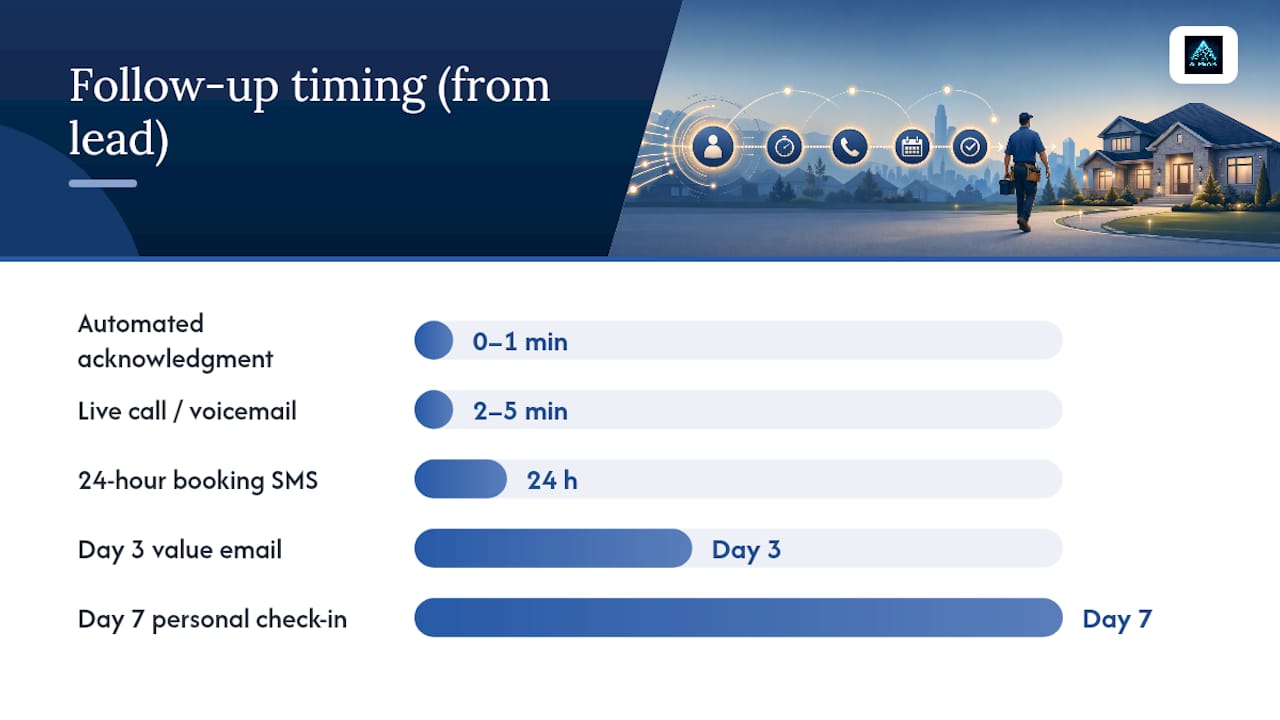
Minute 0 to 1: Automated acknowledgment. Fire an SMS and a branded email simultaneously.
SMS template: "Hi [Name], this is [Business] confirming we received your request for [service]. A team member will call you shortly. Reply STOP to opt out."
Minute 2 to 5: Live call attempt. Phone opener: "Hi [Name], this is [Rep] from [Business]. I just saw your request for [service] come through and wanted to reach you before you talk to anyone else. Do you have two minutes?"
If it goes to voicemail, leave one immediately. Voicemail script: "Hi [Name], [Rep] with [Business]. Got your request for [service] and I'd love to get you a time on the calendar this week. Call or text me back at this number."
Hour 24: Scheduling follow-up. Send an SMS with a direct booking link. Homeowners who didn't answer the call often will book online without ever picking up the phone.
Day 3: Value-add email. Share something concrete: a past project photo, a warranty detail, a common cost question answered. This is effective nurturing done right. It builds trust instead of just pinging for attention.
Day 7: Personal check-in. A short, human text: "Hi [Name], just checking if you still need help with [service] this month. Happy to answer questions."
Day 14 to 30: Breakup message. "Hi [Name], I don't want to keep bugging you. If the timing isn't right, no worries. Reply anytime and we'll pick this back up."
A few rules make this sequence work harder:
- Emergency service categories (burst pipes, no heat, no AC) compress this whole timeline into hours, not days.
- Lower-urgency categories (remodels, landscaping) can stretch touches over three or four weeks without losing the lead.
- Localize language to match how homeowners in your market actually talk. Overly formal phrasing reads as a call center, not a local business.
Pro Tip: Never send the day 3 email and the day 7 text on the same channel back to back. Alternating between text and email keeps you from looking like a script instead of a person.
How to Route HomeAdvisor Leads Into Your Workflow Automatically
HomeAdvisor delivers leads by email notification, and sometimes by API for larger accounts, with a phone call layered on top for premium lead types. If a human has to read that email and manually copy details into a spreadsheet, you've already lost the speed advantage the entire system depends on.
The reliable integration pattern most shops land on looks like this: an email parser or webhook catches the lead notification, an automation layer like Zapier or Make passes the data along, a CRM or job management tool stores it, and an SMS or AI voice responder makes first contact. Each piece is replaceable, but the sequence matters more than any single tool.
| Stack Layer | Function | Example Tool Type |
|---|---|---|
| Capture | Reads incoming lead email or API payload | Email parser, webhook |
| Automation | Passes lead data between systems | Zapier, Make |
| Storage | Holds lead record and history | CRM, job management platform |
| First Contact | Sends SMS, makes AI call, books appointment | Two-way texting platform, AI voice responder |
Missed-call text-back deserves special attention because it catches the leads your team is too busy to answer live. A tech elbow-deep in a water heater can't pick up, but an automated text firing the moment the call is missed keeps that homeowner engaged until someone calls back.
Before rolling any of this out, run a short test list:
- Send a test lead through the parser and confirm it lands correctly in the CRM within seconds.
- Confirm SMS templates render the homeowner's name and service type correctly, not as blank fields.
- Check that leads outside business hours still trigger acknowledgment, since HomeAdvisor requests come in around the clock.
- Verify your team gets a real-time alert when a lead needs a human, not just a dashboard notification nobody checks.
Which Leads Deserve a Human Call Right Now?
Not every HomeAdvisor lead deserves the same five minutes of attention. A basic scoring rubric keeps your team focused on jobs likely to close instead of chasing every inquiry equally.
- Urgency signal: Emergency repairs (no heat, active leak) route straight to a live call attempt, no automation delay.
- Ticket size estimate: Higher-value project categories (roof replacement, full remodel) justify an immediate human call even during busy hours.
- Answer behavior: A homeowner who answers the first call moves to same-day scheduling. One who doesn't answer twice moves into the automated nurture sequence.
- Scheduling window: Leads requesting service "this week" get priority over those browsing for a future quarter.
Tune these thresholds against your own numbers. If your team is converting 40 percent of answered calls but drowning in follow-up on low-ticket leads, tighten the urgency filter so your best rep spends time where it counts. AI-based routing systems can apply this scoring automatically once you know which signals actually predict a booked job in your market.
What to Measure to Know If Your Follow-Up Is Working
Four numbers tell you almost everything: speed-to-first-touch, contact rate, qualified lead rate, and cost per booked job. Track close rate by lead source separately, since HomeAdvisor leads almost always convert differently than referrals or your own website traffic.
Contractors who cut their average response time from hours to under five minutes typically see contact rates climb substantially, because the homeowner is still sitting at their computer or holding their phone when the call comes in.
Three experiments worth running in the same quarter:
- Timing test: Split leads into instant acknowledgment versus a 10 minute delay, then compare contact rates over two weeks.
- SMS wording test: Try a formal acknowledgment against a casual, first-name version and see which gets more replies.
- Voicemail test: Leave a voicemail on half your missed calls and skip it on the other half, then compare callback rates.
Review these numbers every two weeks for the first quarter, then move to monthly once your sequence stabilizes. A realistic improvement target over 60 to 90 days is a meaningful lift in contact rate and a noticeable drop in cost per booked job, not an overnight transformation. Tag every lead with source and campaign so you can trace which changes actually moved the numbers instead of guessing.
Common Mistakes Contractors Make Automating Follow-Up
The biggest failure isn't picking the wrong tool. It's overbuilding the rule set before testing whether the basic sequence even works. Shops that try to automate every branch and exception in week one usually end up with a system nobody trusts, so reps quietly go back to manual follow-up.
The second mistake is skipping edge cases: leads that come in after hours, leads with bad phone numbers, leads tagged with the wrong service type. Test those before you scale.
The fast wins are almost always the same three: instant SMS acknowledgment, missed-call text-back, and a written SLA everyone on the team actually follows. Shops that nail those three before touching anything more complex tend to see the quickest lift in booked jobs, well before they add scoring rules or multi-channel nurture sequences on top.
Why "Just Respond Fast" Isn't the Whole Answer
Most advice on HomeAdvisor leads stops at "call back faster," which is true but incomplete. Speed without a system just means you're fast at losing leads instead of slow at it. The contractors doing well with rented leads treat HomeAdvisor as one input into a routing and nurture machine, not a standalone task somebody remembers to do between jobs.
The conventional wisdom undersells two things. First, tagging discipline matters as much as response speed, because without source and urgency tags you can't tell which parts of your sequence are actually working six months in. Second, the breakup message gets treated as an afterthought when it should be written on day one, since a pipeline full of leads nobody ever closed out is its own kind of revenue leak.
Prioritize the acknowledgment and call SLA first. Everything else, scoring rules, nurture timing, channel mix, is tuning you do after the basic system holds. Build the foundation before you optimize the edges.
Let AI Peak Biz Answer the Lead While You're on the Roof
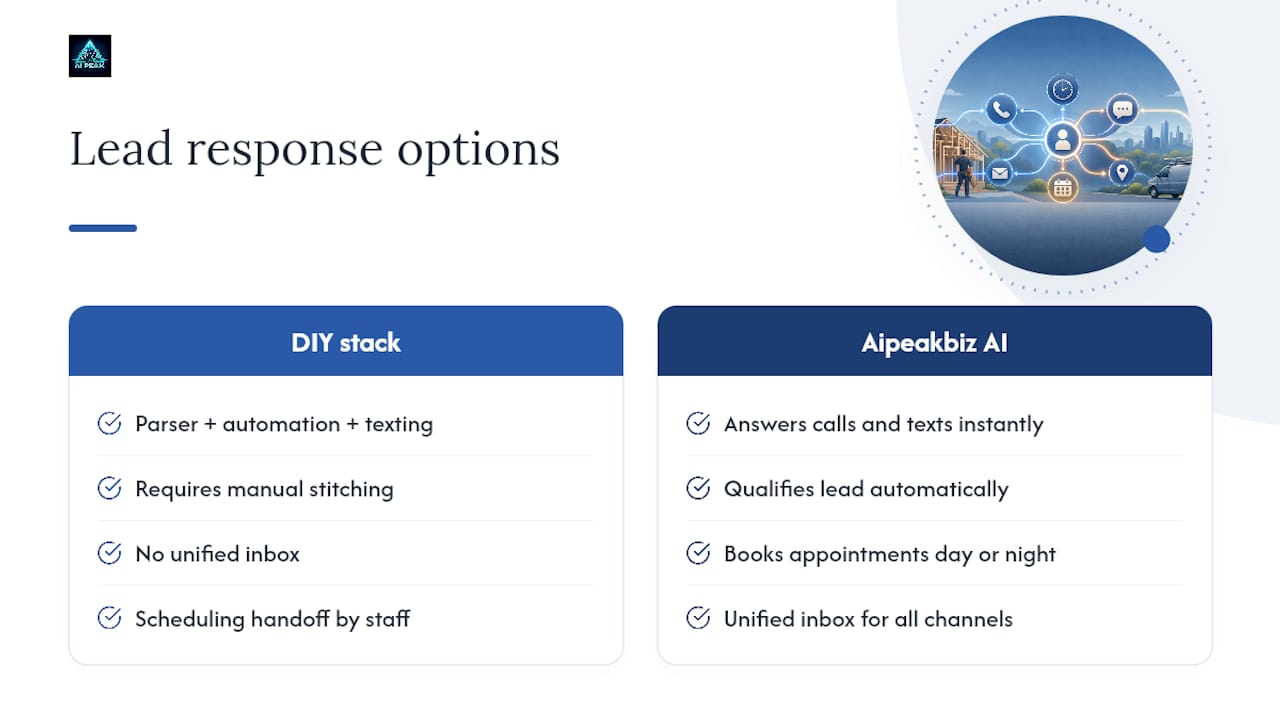
This solution is designed to address the gap between a HomeAdvisor lead landing and someone on your team actually reaching the homeowner. Instead of stitching together a parser, an automation tool, and a texting platform yourself, a specialized AI service can answer calls and book appointments by phone, day or night, without waiting on a human to be free.
For a two-truck plumbing outfit or a landscaping crew running three jobs a day, that means fewer HomeAdvisor leads going cold because everyone was on a roof or under a sink when the call came in. AI Peak Biz combines the AI voice and chat features with a unified inbox, so texts, calls, and web chat all land in one place instead of scattered across apps. The AI appointment setter handles the scheduling handoff automatically once a lead is qualified, which is the exact step most shops still do by hand.
Sources
The FTC's press release on the HomeAdvisor settlement is worth reading directly if you want the marketplace context behind why speed and skepticism both matter with rented leads. Modernize's breakdown of speed-to-lead benchmarks goes deeper into the response-time data referenced throughout this piece, including how contact rates shift as minutes pass.
For the technical side, RaftLabs' guide to automating home service lead follow-up walks through the parser-to-CRM-to-SMS stack in more detail than fits here, including the missed-call text-back recovery figures cited above. HubSpot's executive guide to lead nurturing is a solid primer on building behavioral triggers into a sequence once your basic system is running.
If you want a closer look at implementation pitfalls specific to missed calls, AI Peak Biz's own post on common missed-call follow-up mistakes covers the failure points that tend to show up first.
- Speed to Lead in 2026: Why Contractors Fall to the Level of Their Follow-Up Systems
- FTC: Order requires HomeAdvisor pay $72 million; stop deceptively marketing its leads
- Automate Follow-Up for Home Service Leads (2026 Guide)
- Executive guide to effective lead nurturing, HubSpot
Recommended
- AI Tools for Busy Contractors: Your 2026 Checklist
- How Contractors Can Follow Up on Old, Unsold Estimates