
By AI Peak Biz Team · October 7, 2026
Receptionist Cost for Small Businesses: What Drives the Price

What a receptionist costs a small business depends on which option you choose (an in-house hire, a live answering service, or an AI or virtual receptionist), how many hours you need covered, and how many calls you get. The deciding factor is not the sticker price. It's the billing model, matched against how many calls you actually get. Run the break-even math before you sign anything.
TL;DR:
- Virtual and AI receptionists are usually billed monthly, and costs can climb with added features like lead nurturing and CRM integration.
- Call volume, concurrency, and billing model (flat, per-call, per-minute, or per-agent) significantly influence the actual monthly expenses, especially during peak times.
- Hidden fees such as setup, integration, scripting, overage, and contract terms can substantially increase the total cost beyond the initial quote.
- For low-volume businesses, flat-rate plans are usually the most predictable, while high-volume or 24/7 operations should expect to pay more.
- The best choice depends on your call complexity, volume, and budget, with balancing cost against revenue recovery potential through missed-call capture.
Table of Contents
- What in-house, live answering, virtual, and AI receptionists actually do
- What drives the cost at a glance
- Pricing models and fees that change the final bill
- How call volume and concurrency change your real monthly cost
- AI receptionist vs live answering service vs hiring in-house
- Calculate your ROI and break-even point
- Hidden costs, setup, and customization: avoiding surprises
- How to choose the right receptionist solution
- How we think about receptionist pricing and revenue recovery
- A simpler way to stop losing calls
- Sources
What in-house, live answering, virtual, and AI receptionists actually do
These four options sound similar but solve different problems, and that distinction shapes everything about cost.
An in-house receptionist is a dedicated employee who answers calls, greets visitors, schedules appointments, and often handles light admin work tied to your specific business. A live answering service is an outsourced team of human agents, usually shared across multiple clients, who answer calls under your business name using a script you provide. A virtual receptionist is similar but typically leans more on technology, blending live agents with automated routing, texting, and online scheduling tools. An AI receptionist uses conversational software to answer calls or texts, qualify leads, and book appointments without a human on the line at all, though some setups loop in a person for complex situations.
Hybrid models, where AI handles routine calls and a human step in for escalations or after-hours overflow, have become common because they balance cost against reliability. These hybrids tend to cost more than a pure AI subscription but less than full-time live staffing.
Cost climbs fastest when you add live call transfers, outbound follow-up calls to leads who didn't book, or real-time updates to your CRM. Each of those tasks requires more sophisticated software, more agent time, or both, and vendors price accordingly. A basic answer-and-take-a-message service costs far less than one that also nurtures leads and syncs every interaction to your pipeline.
What drives the cost at a glance
Before you compare quotes, it helps to know what drives the price of each option.
- AI and virtual receptionist subscriptions are usually billed monthly, with basic plans providing call answering and higher tiers adding CRM integration, multichannel texting, and advanced scheduling.
- Live answering services price by call volume and hours covered, with some vendors billing per call or per minute instead of a flat rate.
- In-house receptionists earn a median of $38,010 a year, or $18.27 an hour, according to the Bureau of Labor Statistics. Once you add payroll taxes and benefits, the fully loaded cost typically exceeds this base figure for full-time coverage.
Within each option, the price comes down to hours of coverage and industry. A business needing 24/7 after-hours answering pays more than one needing standard 9 to 5 support, and specialized industries like healthcare or legal services often pay a premium for agents trained to handle compliance-sensitive calls. A part-time front desk role in a low-call-volume shop costs far less than full-time coverage, while a busy multi-location service business can cost much more.
Pricing models and fees that change the final bill
The headline price a vendor quotes rarely matches what lands on your invoice three months in. Four billing structures dominate the market, and each rewards a different calling pattern.
- Flat monthly pricing bundles a set number of calls or minutes into one price, which works well for predictable, low-to-moderate volume.
- Per-call pricing charges a fee for every call answered, which can stay cheap for light volume but balloons fast during a busy season or marketing push.
- Per-minute pricing bills by talk time, so long, detailed calls, common in home services and healthcare, cost more than quick scheduling calls.
- Per-seat or per-agent pricing charges based on how many staff or AI "lines" you need running simultaneously, which matters most for businesses with multiple locations or departments.
Concurrency limits deserve special attention. Many vendors cap how many calls can be handled at the same time under a given plan. If your phone rings three times at once during a Monday morning rush and your plan only covers two concurrent calls, the third caller hits voicemail or a busy signal, which defeats the purpose of paying for coverage in the first place.
Hidden fees are where a reasonable-looking quote turns into a surprising invoice. Setup and onboarding fees cover initial configuration and script writing. Integration fees apply when you need the service connected to your CRM, scheduling software, or payment system. Custom scripting charges show up when your call flow needs more than a generic greeting and message-taking. Overage fees kick in once you exceed your plan's included calls or minutes, sometimes at a steep per-unit rate. Seat add-ons apply if you later need a second line or additional agent capacity.
Before signing, ask every vendor the same set of questions: What's included in the base price, and what triggers an overage charge? Is there a setup fee, and what does it cover? What happens if I exceed my concurrency limit? Can I see a sample invoice from a client with similar call volume to mine?
Pro Tip: Ask for a worst-case monthly estimate based on your busiest month last year, not your average month, so you're not blindsided by seasonal spikes.
How call volume and concurrency change your real monthly cost
The same service can cost wildly different amounts depending on how busy your phone actually is. Three scenarios show how this plays out.
- Solo technician, low volume: A flat monthly plan is usually cheapest and most predictable. Per-call pricing might run similar or slightly lower here, but per-minute billing can get expensive if calls run long, since a single solo operator often handles detailed troubleshooting conversations.
- Small team, a few techs, mid-volume with appointment booking: Flat-tier plans with CRM integration are common at this size. Per-call or per-minute billing at this volume often exceeds flat pricing once you add the cost of booking logic and follow-up texts, so a bundled plan often wins on value.
- 24/7 or heavy after-hours service business: Concurrency becomes the deciding cost factor, not just volume. Covering overnight and weekend calls with overflow capacity for multiple simultaneous callers costs more for live or hybrid answering, especially once overage and premium-hours fees apply.
Integration needs scale with complexity too. A solo operator might need nothing beyond basic call answering, while a growing team usually wants CRM syncing, and a 24/7 operation often needs custom routing rules for emergencies versus routine requests. Each added integration tends to carry its own setup charge, so it's worth confirming which tier includes what before comparing final numbers across vendors.
AI receptionist vs live answering service vs hiring in-house
Each option optimizes for a different mix of cost, reliability, and personal touch, and the right fit depends heavily on your call patterns and budget ceiling.
- AI receptionist: Generally the lowest monthly cost option, available around the clock, effective for appointment booking and basic lead qualification, but may not handle nuanced or emotionally sensitive calls well.
- Live answering service: Typically mid to higher monthly cost depending on volume and hours, offers a human voice and better handling of complex requests, though shared agents might not be deeply familiar with your business.
- In-house receptionist: Usually the highest yearly cost after adding taxes and benefits, but provides full familiarity with your business, in-person support, and the ability to handle walk-ins and extra tasks beyond calls.
For a solo operator or small team with straightforward scheduling needs, an AI receptionist often provides the best cost-to-coverage ratio, as you pay for availability rather than a full salary. Businesses that field complicated or sensitive calls, like legal intake or healthcare scheduling, often lean toward live answering because callers expect a human response and nuance matters more than speed. A business with enough call and foot-traffic volume to justify a full-time salary, or one that needs in-person reception alongside phone duties, is usually better served hiring in-house despite the higher cost.
Reliability during peak hours favors AI and hybrid models, since concurrency can scale without hiring more staff. Integration with existing software tends to favor AI and virtual options too, since most were built with CRM and calendar syncing in mind from the start, while traditional live answering services sometimes bolt that functionality on less smoothly.
Calculate your ROI and break-even point
Whichever option you're weighing, the real question is whether it pays for itself, and that calculation is simpler than it looks.
- Count your missed calls. Check your phone system or voicemail log for a typical month.
- Estimate your conversion rate. What percentage of answered calls from new leads typically turn into booked jobs?
- Multiply: additional answered calls times conversion rate times average job value equals recovered revenue.
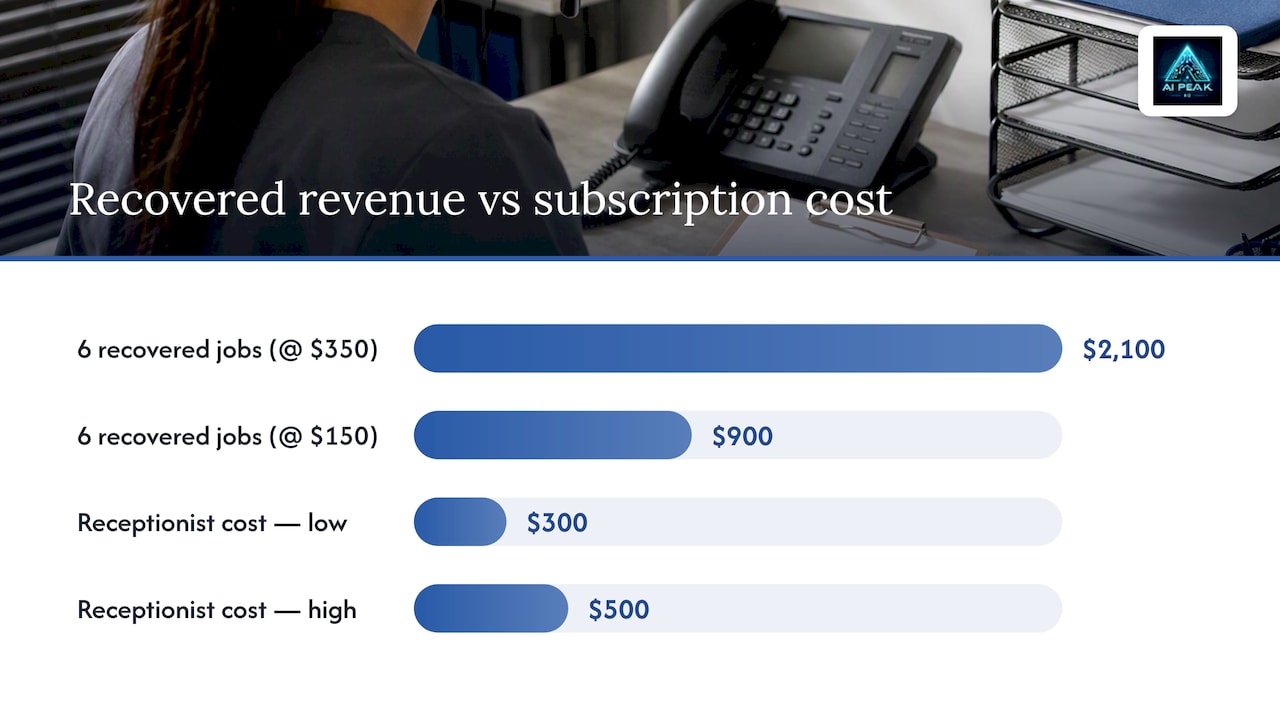
Worked example: Say an HVAC business misses 20 calls a month that would otherwise have been answered.
Hypothetically, if 6 of those 20 calls would have booked at a $350 average job, that's $2,100 a month in recovered revenue; compare that against what each receptionist option would cost you each month, using your own numbers, before you decide.
Sensitivity matters here. If your average job value is closer to $150 instead of $350, the same 6 recovered jobs only generate $900, which narrows the margin, especially against pricier live answering plans. After-hours calls often carry extra weight in this calculation, since a missed emergency call for a plumbing or HVAC business can represent a higher-than-average ticket.
During any trial period, track actual answered calls, booked appointments, and closed revenue against your baseline before the trial started. That's the only way to know whether the recovered revenue actually covers the subscription cost in your specific business, rather than relying on industry averages. For a deeper look at tying ROI math to broader operational software, this ROI calculation guide for field service platforms walks through similar job-costing logic.
Hidden costs, setup, and customization: avoiding surprises
The quoted monthly price is rarely the whole story. A few categories of cost tend to surface only after you've signed.
- Setup fees typically cover initial script writing and account configuration, and are reasonable when they include a real onboarding call rather than a generic template.
- Integration costs apply when connecting the service to your CRM, calendar, or payment system, and can range from a one-time charge to an ongoing per-integration fee.
- Training and script customization fees show up when your call flow needs more than basic greetings, especially for businesses with multiple service lines or complex intake questions.
- Contract terms around trial length, exit clauses, and service-level agreements determine how much risk you're taking on if the service doesn't perform as promised.
Pro Tip: Negotiate a short trial period with no long-term commitment before signing an annual contract, and get the cancellation terms in writing before you need them.
How to choose the right receptionist solution
Choosing the right fit comes down to weighing a handful of criteria against your actual call patterns, then stress-testing any vendor or candidate with direct questions.
Start by weighing your call volume, hours of coverage needed, average ticket size, call complexity, required integrations, and monthly budget ceiling against each other. A business with high call volume but simple requests might do fine with AI, while one with low volume but highly complex calls might need a human every time.
- Ask vendors what exactly triggers an overage or additional fee.
- Ask whether pricing is flat, per-call, per-minute, or per-seat, and request a sample invoice.
- Ask how concurrency limits work during your busiest hours.
- Ask what's included in setup versus billed separately.
- Ask about contract length, exit terms, and whether a trial period is available.
- Ask how call transfers to a human are handled and priced.
- Ask what integrations are supported out of the box versus custom-built.
- Ask how scripts get updated once your business needs change.
- Ask for references or examples from businesses similar in size and industry.
- Ask what happens to your data and call history if you cancel.
Red flags include vague pricing that avoids naming overage rates, contracts that lock you in for a year with no trial, and any seller unwilling to share a sample invoice. Once you've narrowed your options, run the break-even math from the earlier section, start a trial if one's offered, and measure actual recovered revenue against the subscription cost before committing long-term.
How we think about receptionist pricing and revenue recovery
We built our approach around a simple observation: the real cost of a missed call is rarely the phone bill, it's the job that walked to a competitor instead. Most pricing conversations focus on what a receptionist costs per month, but we think the more honest question is what a missed call costs you, every single time it happens.
That's why we weight our own product decisions toward instant response and hands-on onboarding rather than handing someone a dashboard and hoping they figure it out. A fast answer to a lead who's ready to book matters more than a cheaper line item on a monthly statement. We've found that business owners who treat receptionist cost as a revenue recovery decision, not just a line-item expense, make better choices about which option actually fits their business.
A simpler way to stop losing calls
If you've worked through the break-even math above and the numbers point toward recovering more missed-call revenue, we built our platform to handle that without asking you to stitch together five different tools.
Our plans combine AI call and text answering, lead qualification, appointment booking, a unified inbox across text, email, and social channels, and CRM pipeline tracking into one subscription, with hands-on setup instead of a self-serve dashboard you're left to configure alone.
Piecing together separate software for calls, texting, scheduling, and a CRM usually means paying for and managing several subscriptions that don't talk to each other. A managed, all-in-one option keeps everything in one inbox and one bill, with someone helping you set it up rather than leaving you to configure it from scratch.
FAQ
How much does a receptionist cost?
A receptionist's cost depends on the type: an AI or virtual service and live answering are usually billed monthly based on hours covered and call volume, while an in-house hire has a median wage of $38,010 a year according to the Bureau of Labor Statistics. The final number depends heavily on billing model and call volume, which is why a break-even calculation matters more than the headline price.
Is a virtual receptionist good for a small business?
A virtual receptionist works well for small businesses with moderate call volume and straightforward scheduling needs, since it typically costs less than a full-time hire while still covering extended hours. It fits less well for businesses handling highly complex or sensitive calls that benefit from a dedicated, familiar human voice.
How much should I charge for my services?
Pricing your own services isn't something a receptionist cost guide can answer directly, since it depends on your local market, costs, and competition rather than phone-answering economics. A useful starting point is calculating your fully loaded costs, including any receptionist or answering service expense, then pricing jobs to cover that overhead with a sustainable margin.
How much does IT support typically cost for a small business?
IT support costs vary widely by provider, service scope, and business size, and aren't covered by receptionist pricing data. If you're evaluating multiple operational costs at once, it's worth budgeting IT support and receptionist coverage separately, since they draw on different vendor markets entirely.