
By AI Peak Biz Team · September 8, 2026
7 Steps to SMS First Review Request Automation for Local Service SMBs

Automate your review requests with a triggered text message, sent right after the job closes, with a direct link to your Google profile and one polite follow-up two or three days later. Filter out anyone who already reviewed you, opted out, or was contacted recently. That combination, triggered SMS plus a single reminder plus clean exclusion rules, is what separates businesses that steadily climb their star rating from businesses that beg for reviews once a quarter and wonder why nothing changes.
TL;DR:
- Automated review requests increase review volume and improve review quality by prompting satisfied customers shortly after service completion.
- Proper trigger setup includes job completion, payment, appointment closure, or support resolution, integrated via native apps, middleware, or APIs.
- Sending SMS review requests within one to four hours for quick services, and same day or next morning for longer projects, boosts response rates significantly.
- Compliance with TCPA and platform rules requires explicit opt-in, clear opt-out language, and respecting quiet hours, especially for regulated industries.
- A successful system relies on integrating review requests into a broader communication flow that ensures consistent trigger events and ongoing lead management.
Table of Contents
- What Automated Review Requests Do for Your Business
- How Review Request Automation Works: Triggers, Integrations, and Sequence Design
- Which Channel Wins: SMS or Email?
- Templates and Follow-Up Cadence That Actually Convert
- Compliance Essentials: TCPA and Platform Rules You Must Follow
- Measuring Success: KPIs and Healthy Benchmarks
- Implementation Checklist: Launch in 7 Steps
- Publisher Perspective: Why the Automation Itself Isn't the Hard Part
- Ready to Automate More Than Just Review Requests?
- Sources
What Automated Review Requests Do for Your Business
Manual review requests fail for a simple reason: they depend on a busy technician, front-desk person, or owner remembering to ask, then remembering how to ask well. Most days, that memory loses to a packed schedule. Automation removes the "did we remember" variable entirely by firing the request the moment a job closes, an invoice clears, or an appointment wraps.
The payoff shows up in three places. Review velocity increases because every satisfied customer gets asked, not just the ones who happened to catch someone at the counter on a good day. You collect more 5 star reviews from customers who were genuinely happy but would never have written one unprompted. And you catch service problems earlier, since a well-built flow routes anyone who signals a bad experience straight to a private feedback form instead of a public review page, as vendor documentation on review request routing shows.
Reviews are not a nice-to-have for local businesses. Consumers lean heavily on local business recommendations and online reviews when picking who to call, which means a steady stream of fresh, positive reviews compounds into real lead flow over time. A healthy automated program typically produces:
- Higher review volume per month without added staff effort
- A higher share of 5 star reviews from customers who felt cared for
- Faster detection of service issues before they become public complaints
- Predictable delivery and completion rates you can track and improve
How Review Request Automation Works: Triggers, Integrations, and Sequence Design
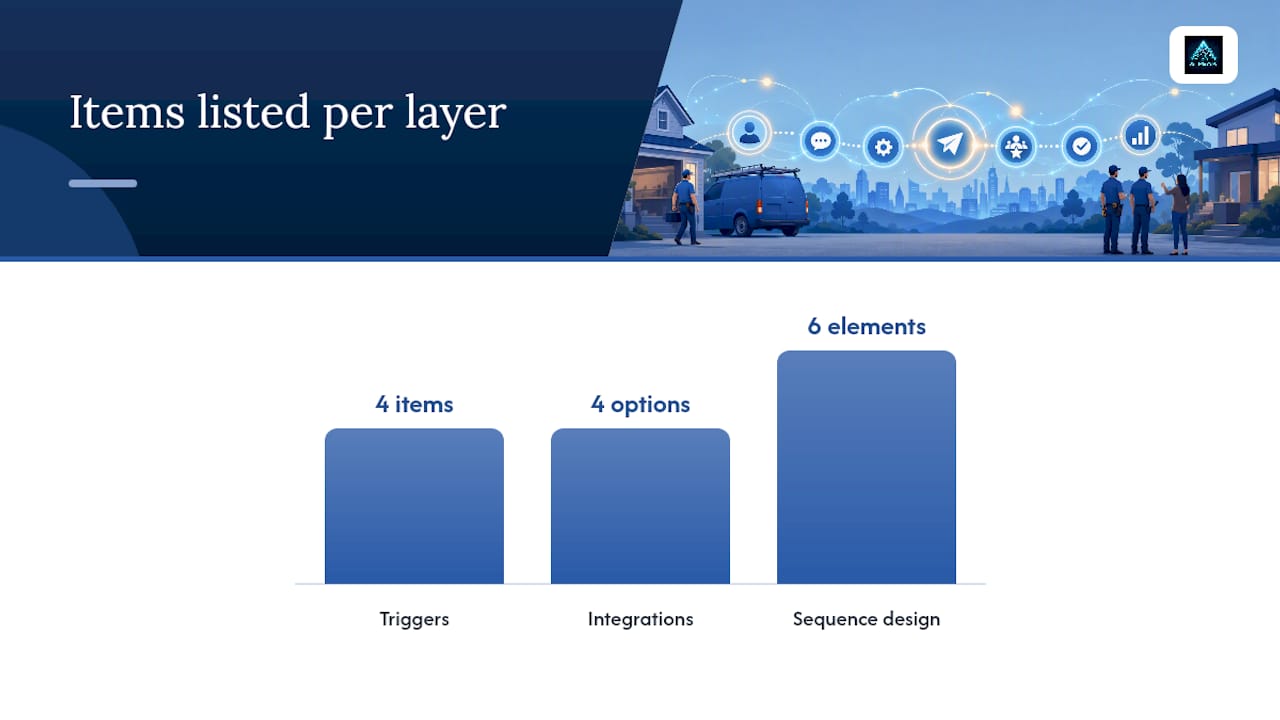
Every automated review program runs on three layers: a trigger that starts the sequence, an integration that connects your systems, and a sequence that decides what message goes out and when. Get those three right and the rest is mostly copy and timing.
Triggers are the events that tell your system "this customer is ready to be asked." The most common ones for service businesses:
- Job marked complete in your field service or scheduling software
- Invoice paid or payment processed at checkout
- Appointment closed out in your booking calendar
- Support ticket resolved in your helpdesk or CRM
Integration routes connect that trigger to your messaging tool. You have four realistic options: a native connector built into your CRM or review platform, a middleware tool like Zapier or Make for systems without direct integrations, a REST API if you have developer resources, or direct field mapping inside your CRM's own workflow builder. Most local service businesses do fine with a native connector or Zapier, reserving custom API work for higher-volume operations.
Sequence design is where the real skill lives. A basic sequence sends an initial SMS shortly after the trigger fires, waits a set window, then sends one reminder if the customer has not clicked. Frequency caps stop the same customer from getting hit twice in one billing cycle, and exclusion logic checks whether the customer already reviewed you, opted out, or was contacted inside a cooling-off period before anything goes out. Smart setups also branch by outcome, routing a "closed positive" status toward the public review link and a "closed neutral or negative" status toward a private form, exactly the sub-status pattern described in Lawmatics' setup documentation.
Before rolling this out to your full customer list, pilot it. Send to a sample batch, watch your opt-out and complaint rates closely for a week, then scale once delivery and response look clean. Skipping the pilot is how businesses end up with an angry customer service ticket instead of a five-star review.
Which Channel Wins: SMS or Email?
SMS wins for most local service businesses, and the gap isn't close. Text messages get read within minutes of arriving, and SMS review programs commonly convert three to five times better than email-first campaigns, according to Plaudit's analysis of SMS review request performance. A direct link inside a text message removes almost every barrier between "happy customer" and "posted review."
Timing matters as much as channel. A customer who just watched a technician fix their air conditioner is primed to respond within an hour or two, while someone who wrapped up a longer project might need a day to reflect before they're ready to write something thoughtful.
- Quick services (repairs, single visits, walk-in appointments): send within 1 to 4 hours of job completion
- Longer engagements (remodels, multi-day projects, consultations): send same day or the next morning
- B2B clients or anyone without a mobile number on file: use email instead, since SMS consent and delivery rules don't apply the same way
- Regulated industries (healthcare, legal, financial services): default to email unless you've confirmed SMS consent meets your industry's specific requirements
Respect quiet hours. Nobody wants a review request buzzing their phone at 9 p.m., and sending outside a reasonable local window (generally 8 a.m. to 8 p.m. in the recipient's own time zone) increases both opt-outs and spam complaints. Building timezone-aware delivery into your sequence protects your sender reputation just as much as it protects the customer's evening.
Templates and Follow-Up Cadence That Actually Convert
Short, personal, single-ask messages outperform anything that reads like marketing copy. Keep every message under two sentences, use the customer's first name, and never ask for more than one thing.
SMS templates:
- Initial: "Hi [First Name], thanks for choosing [Business Name]! Mind leaving us a quick review? [Link]"
- Reminder (2 to 3 days later): "Hi [First Name], just following up. If you have 30 seconds, a review would mean a lot: [Link]"
- Completion/thank-you: "Thanks so much for the review, [First Name]! We appreciate you."
Email templates (for customers without SMS consent):
- Subject: "How did we do, [First Name]?" with a short body thanking them and one clear button linking to your review page
- Subject: "Quick favor?" as a lighter-touch reminder, sent once, three to four days after the first email
Stick to one reminder. Data on SMS review campaigns shows that a single, well-timed follow-up captures roughly 30 to 50 percent of a program's total reviews on its own, which means a second or third nag rarely earns its keep and mostly just annoys people who were never going to respond.
A/B test three knobs before touching anything else: personalization depth (first name only versus first name plus service type), call-to-action phrasing ("leave a review" versus "share your experience"), and send timing (immediate versus a two-hour delay).
Pro Tip: Run your first A/B test with a service-type variable, like mentioning "your AC repair" instead of a generic "your service." That small detail alone often lifts click-through because it proves the message isn't a mass blast.
Compliance Essentials: TCPA and Platform Rules You Must Follow
TCPA compliance is not optional, and it's the single fastest way to turn a good idea into a legal headache. You need documented opt-in consent before sending any marketing text, and every message needs clear opt-out language, typically "Reply STOP to unsubscribe." When a customer texts STOP, that request has to be honored immediately and permanently.
Carrier registration matters too. Most legitimate review request platforms handle 10DLC sender registration on your behalf, which keeps your messages from getting filtered or blocked by carriers as spam.
Platform rules add a second layer. Google and other review sites explicitly prohibit incentivizing reviews or soliciting only positive ones, sometimes called "review gating." Never offer a discount for a review, and never route only happy customers toward the request while burying dissatisfied ones. Build your program around three operational controls: documented consent capture at the point of service, an exclusion list that respects opt-outs and cooling-off periods, and quiet-hours enforcement on every send.
Measuring Success: KPIs and Healthy Benchmarks
Three numbers tell you almost everything about whether your program is working. Delivery rate should sit at 95% or higher; anything lower usually points to bad phone numbers, carrier filtering, or a sender that isn't properly registered.
Completion rate, meaning the share of clicks that turn into an actual posted review, is the metric most businesses ignore and shouldn't. A wide gap between clicks and completed reviews usually means friction at the review platform itself, like a login wall or a clunky form, rather than a problem with your message.
Track these monthly alongside review velocity and opt-out rate:
- Delivery rate (set a target from your own baseline)
- Click-through rate on the review link (track against your own baseline)
- Completion rate, click to posted review (track against your own baseline)
- Opt-out and complaint rate (your early warning system for message fatigue)
Implementation Checklist: Launch in 7 Steps
You don't need a six-month project plan to get this running. Most local service businesses can have a working automation live within a couple of weeks.
- Collect mobile numbers and consent language at booking or checkout, not after the fact
- Identify your trigger event and map it inside your CRM, scheduling tool, or POS
- Build the connector, whether that's a native integration, Zapier, or a direct API call
- Write your initial message and one reminder, and paste in a direct link to your review page
- Set frequency caps and exclusion rules to skip prior reviewers, recent contacts, and opted-out numbers
- Pilot with at least 200 messages per variant before drawing conclusions on copy or timing, then measure delivery, CTR, and completion
- Assign one person to own monitoring, respond to opt-outs, and document how negative feedback gets escalated internally
A full setup walkthrough can save you from rebuilding this from scratch, especially the trigger-mapping step, which is where most first attempts stall out.
Publisher Perspective: Why the Automation Itself Isn't the Hard Part
Here's what most guides on this topic get wrong: they treat review request automation as a standalone project, something you bolt onto your existing systems and forget about. It isn't. The businesses that actually see their star rating climb are the ones where review requests are one output of a much larger communication system, not an isolated tool running in the background.
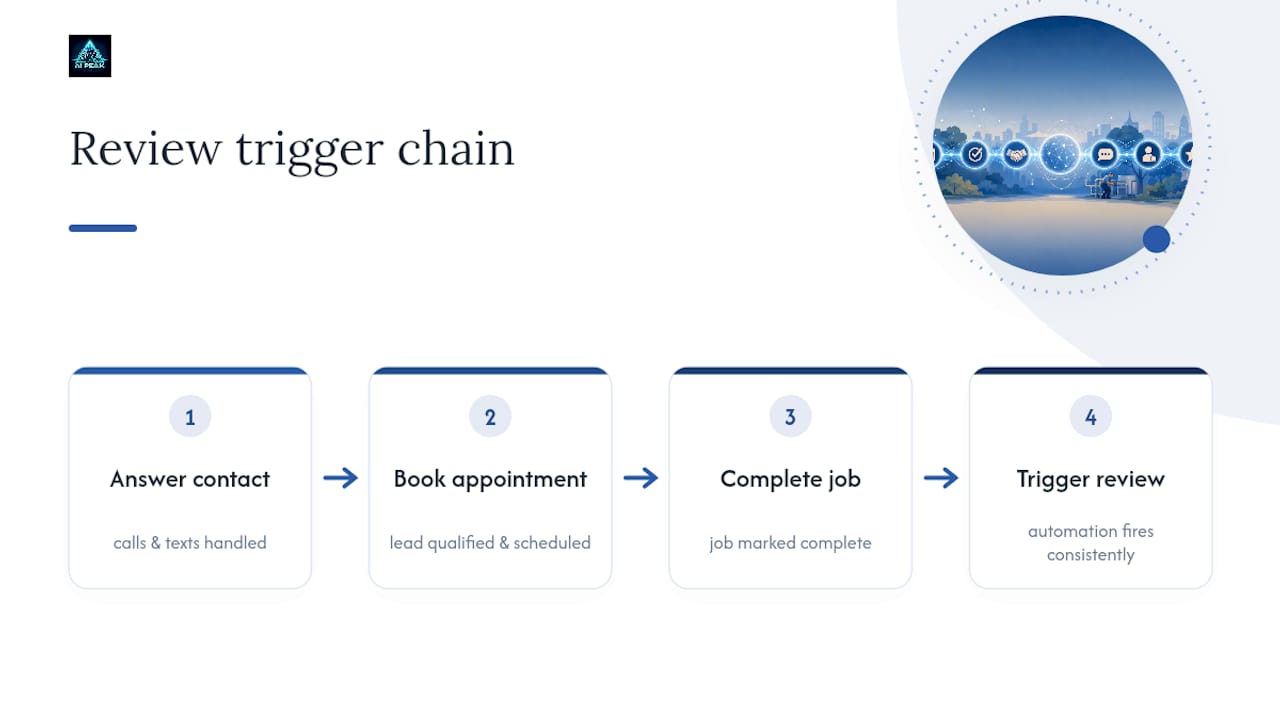
Think about what has to happen before a review request ever fires. Someone has to answer the phone. Someone has to book the appointment. Someone has to mark the job complete in a system that talks to your messaging platform. If any of those steps rely on a missed call or a delayed callback, your review pipeline is only as good as your weakest link upstream.
That's the piece this AI-based system was built around. Its Ascent plan includes an AI voice agent that answers calls and books appointments by phone, and Summit adds missed-call text back, which helps the trigger events feeding your review automation happen more consistently instead of depending on whoever's at the front desk that day. Pairing personal account management with the automation, rather than handing you a self-serve dashboard and walking away, is what keeps the setup tailored to how your specific business actually runs. Automating the ask matters. Automating the entire chain that makes the ask possible matters more.
Ready to Automate More Than Just Review Requests?
Building the flow described above, trigger, template, filtering, compliance, is doable on your own. But most owners we talk to don't lack the knowledge, they lack the hours to wire it correctly and keep it maintained while running the actual business. This setup is handled end-to-end: CRM trigger mapping, consent capture at booking, review link templates, and compliance checks, so the automation runs correctly from week one instead of after three rounds of trial and error.
Onboarding includes expert setup of your triggers and sequences, testing across a sample batch before full rollout, and a compliance review so your opt-in and opt-out handling holds up. Because the same system also answers your calls and texts, qualifies leads, and books appointments, your review request automation connects to a front desk that helps you catch the trigger event in the first place. If you're ready to see what a fully wired setup looks like for your business, check current plans and pricing or explore the AI chatbot features that power the whole system.
Sources
For deeper setup detail, Lawmatics' help documentation shows real sub-status routing. Plaudit's SMS guide covers timing and template best practices. MessageIQ's breakdown explains cadence and pilot testing. For broader context on review influence, see Statista's consumer research.
- How to create a review request automation | Lawmatics Help Center
- SMS review requests: How to get more reviews by text | MessageIQ
- Local business recommendation methods | Statista
Recommended
- Automated Review Request Systems: The Complete Setup Guide
- Automated Call Follow-Up System: A Business Owner's Guide