
By AI Peak Biz Team · September 12, 2026
Speed to Lead for Service Businesses: Respond in Under 5 Minutes

Speed to lead is the time between a prospect's first action, a form submission, a call, a chat message, and your first meaningful response. The benchmark that matters: under 5 minutes for high-intent leads, with under 2 minutes as the real target. This article breaks down the benchmarks by lead type, shows you how to measure response time correctly, and hands you a prioritized playbook to close the gap between where you stand now and where you need to be.
TL;DR:
- Contact high-intent leads within 2 minutes and all other lead types within their respective timeframes to maximize conversion and revenue.
- Automate routing, enable calendar embedding, and set up multi-channel notifications to significantly reduce response times without overloading staff.
- Measure response times from the actual form submission, focusing on median values to get an accurate picture of performance and identify improvement areas.
- Slow response often results from manual routing, staffing gaps, or poor notifications, which should be addressed in that order for cost-effective gains.
- Implement AI tools like voice assistants, chatbots, and automated appointment setters to achieve near-instant responses around the clock and beat competitors.
Table of Contents
- What Counts as a Response in Speed to Lead?
- Why Does Speed to Lead Actually Matter?
- What Are the Right Speed to Lead Benchmarks by Intent?
- How Do You Actually Cut Your Response Time?
- How Do You Measure Speed to Lead Correctly?
- Why Is Your Team Still Slow to Respond?
- What Should You Look for in a Speed to Lead Tool?
- How AI Peak Biz Applies Speed to Lead in Practice
- What I'd Tell You Before You Roll This Out
- Ready to Stop Losing Leads to Slower Competitors?
- Sources
What Counts as a Response in Speed to Lead?
The clock starts the moment a prospect acts, not when your rep notices the notification. That means the timer begins at form submission, the first message in a chat window, or the instant a call comes in. Many companies mistakenly measure from when a lead lands in the CRM instead of when it actually arrived on the form platform, which can add minutes of hidden delay.
"First meaningful response" doesn't require a live human voice on the other end. An automated reply counts, as long as it adds value rather than just confirming receipt. A text that says "Thanks, we got it!" is not a meaningful response. A text that offers a scheduling link, answers a specific question, or routes the lead to a relevant resource is. Chili Piper's research on this distinction is worth internalizing: a tailored automated response preserves interest until a human takes over, which matters enormously for teams that can't staff live coverage 24 hours a day.
Channel expectations differ, and treating every lead the same way is a mistake:
- Phone calls: An unanswered call is the worst outcome. A missed-call text-back within seconds keeps the door open.
- SMS: Prospects expect near-instant replies, similar to texting a friend. Anything past a few minutes feels like being ignored.
- Web chat: Real-time or nothing. A chat window that goes quiet for 10 minutes is worse than not offering chat at all, because it signals disorganization.
- Email: More forgiving, but still time-sensitive. Same-hour beats same-day.
- Scheduler/demo requests: The best response is often no wait at all, letting the prospect book a slot the moment they submit the form.
Get the starting point right, and every other benchmark in this article becomes measurable instead of theoretical.
Why Does Speed to Lead Actually Matter?
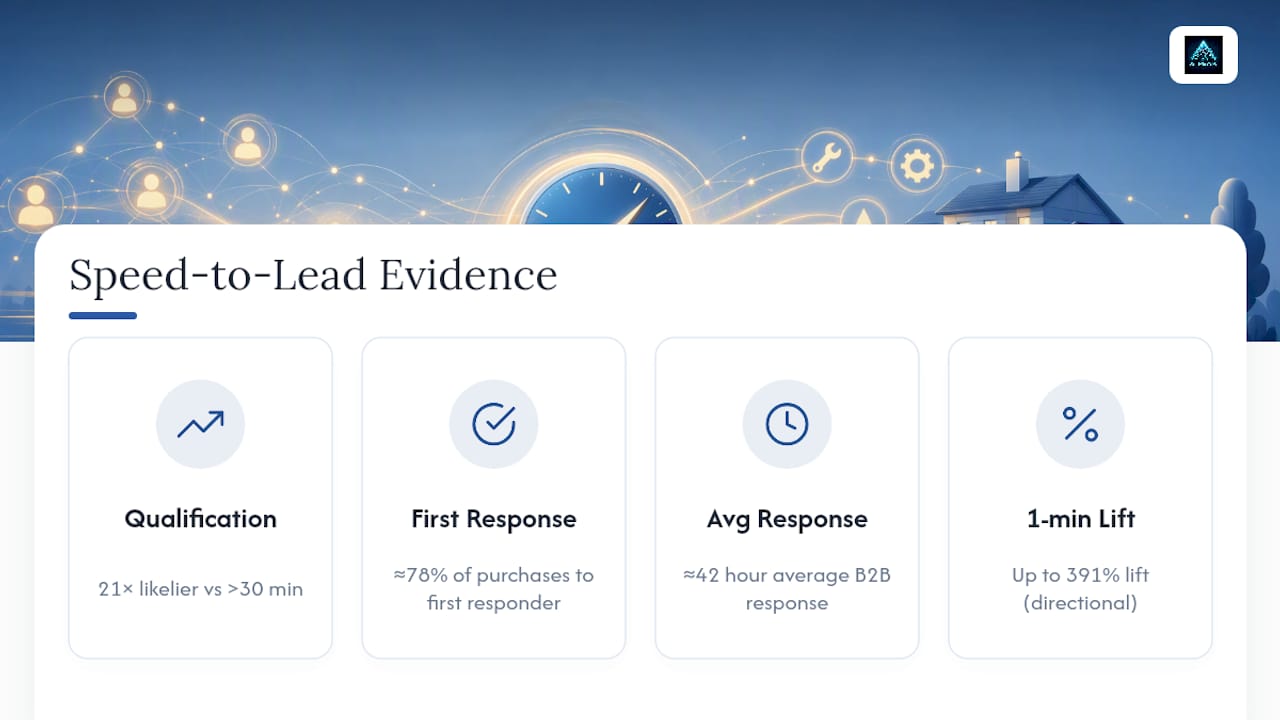
The numbers here are not marginal. Leads contacted within five minutes are roughly 21 times more likely to qualify than leads contacted after 30 minutes, according to the widely cited InsideSales and MIT lead response research. That is not a modest edge. It is the difference between a pipeline that converts and one that quietly bleeds out.
Harvard Business Review's research on online sales leads found that a majority of purchases, cited at roughly 78%, go to whichever company responds to the lead first. Prospects filling out a form on your site are almost always filling out the same form on two or three competitors' sites in the same sitting. The company that picks up the phone first usually wins the deal before the others even finish their coffee.
The decline in lead quality isn't linear, it's closer to exponential. A lead that goes stale after 30 minutes has usually already engaged with another vendor, filled out a competing form, or simply lost the urgency that drove them to reach out in the first place. Some vendor research has cited response-time conversion lifts as high as 391% for contact within the first minute, a number worth treating as directional rather than gospel, but the underlying pattern holds up across nearly every study on this topic: every additional minute of delay costs you conversion probability.
Translate that into revenue terms. If your marketing team spends money generating leads and your sales team lets those leads cool for even 30 minutes, you are burning a meaningful share of your customer acquisition budget on leads that were reachable and simply weren't reached in time. Fixing speed to lead is rarely a marketing spend problem. It is almost always a workflow problem.
What Are the Right Speed to Lead Benchmarks by Intent?
Not every lead deserves the same urgency. A prospect requesting an emergency plumbing quote behaves differently than someone who downloaded a pricing guide out of curiosity. Building your SLA around lead intent, rather than a single blanket target, keeps your team focused on the leads that actually convert.
| Lead type | Target response window | Why |
|---|---|---|
| High-intent (quote request, demo booking, emergency service) | Under 5 minutes, ideally under 2 | Highest willingness to buy right now; competitors are contacting them too |
| Mid-intent leads (e.g., contact forms, consultation requests) | Within about an hour | Maintains engagement while urgency may be lower |
| Low-intent leads (e.g., content downloads, newsletter signups) | Within a day | Focuses more on relevance than rapid response |
| Live chat interactions | Near-instant, about a minute | Meets real-time user expectations |
Sample SLA wording for a service business might read: "All quote requests receive a response within 5 minutes during business hours, and within 15 minutes after hours via automated scheduling."
When resources are tight, and most teams' resources are tight, prioritize in this order:
- Fix high-intent lead response first. This segment has the highest dollar value per lead and the steepest ROI on speed.
- Fix chat second. It's the channel where slow response does the most reputational damage.
- Fix mid-intent third, since the decay curve is gentler here.
- Automate low-intent nurture last, because volume is high and per-lead urgency is genuinely lower.
This intent-based sequencing matters more than most teams realize. Chasing a uniform "respond to everything in 5 minutes" policy burns out your best reps on low-value leads while high-intent leads sit in the same queue as newsletter signups.
How Do You Actually Cut Your Response Time?
Fixing speed to lead isn't a single project, it's a stack of smaller fixes that compound. Work through them roughly in this order, starting with the changes that require the least engineering effort and the most immediate payoff.
-
Shorten your forms. Every extra field is a few more seconds of friction and a few more seconds of delay before the lead even reaches your team. Ask for name, phone, and the one detail your team truly needs to qualify the lead. Everything else can wait until the conversation starts.
-
Add data enrichment at capture. Tools that auto-fill company size, location, or service history the moment a lead submits a form let your rep skip the research step and go straight to a relevant conversation. This alone can shave minutes off your internal handling time.
-
Embed a scheduler directly on the form or thank-you page. This is arguably the single highest-leverage fix on this list. When a prospect can book a specific time slot the instant they submit a request, you've effectively reduced speed to lead to zero for that lead, because there's no waiting on a human to reach out and coordinate a time. Chili Piper's research on this pattern shows calendar embedding removes the manual routing delay almost entirely. Booking page guidance walks through the layout choices that make this conversion-friendly rather than clunky.
-
Automate lead routing. Manual routing, where a lead sits in a shared inbox until someone notices it, is one of the most common bottlenecks in the entire speed-to-lead chain. Route by territory, service type, or round robin automatically, and the lead reaches a rep's queue in seconds instead of sitting unclaimed for an hour.
-
Build escalation rules. If the assigned rep doesn't respond within a defined window, say 3 minutes, the lead should automatically reassign or alert a manager. Escalation rules are what keep a single overloaded rep from becoming a bottleneck for your whole pipeline.
-
Filter spam before it hits your reps' queue. Bot submissions and junk leads waste rep attention and slow down real prospects sitting behind them in the queue. A basic spam filter at the form level keeps your team focused on leads worth responding to.
-
Fix your notification strategy. Email alone is not fast enough. Push a notification through multiple channels at once: mobile push, a Slack or Teams alert, and an SMS to the assigned rep. A useful notification payload includes the lead's name, phone number, service requested, and a one-click "claim" button, so the rep can act in seconds without opening a separate CRM tab.
-
Build after-hours coverage. Assign a rotating duty rep for evenings and weekends, or route after-hours leads into a shared queue with an automated first response that buys time until a human follows up in the morning.
-
Pilot before you scale. Roll changes out to one lead segment or one form first, measure the effect on response time and conversion, then expand once you've confirmed the change works in practice.
-
Coach and incentivize speed. Make response time visible on the same dashboard as close rate, and consider tying a small part of rep compensation to SLA adherence. Reps respond to what gets measured and rewarded.
Pro Tip: Test your own form as if you were a customer, submit it from your phone on a Friday at 6 p.m., and time how long it takes for a real, useful response to land. Most teams are shocked at what they find when they run this test on themselves.
How Do You Measure Speed to Lead Correctly?
Bad measurement produces false confidence, and speed to lead is a metric that's easy to measure badly. The most common mistake: timestamping from when a lead lands in the CRM rather than when the prospect actually submitted the form. Pull your timestamp from the form platform itself, then build a "minutes to first touch" formula field in your CRM that calculates the gap between form submission and first logged contact.
Report the median, not the average. A single lead that sat untouched for six hours over a holiday weekend can drag your average response time up by minutes, hiding the fact that your typical lead is actually handled quickly. The RevOps Report's benchmarking guidance makes this point directly: median response time gives a far more honest read on day-to-day performance than a mean skewed by outliers.
Beyond the median, track a handful of supporting metrics that actually drive remediation:
- Percent of leads under SLA, broken out by lead intent tier.
- Median response time per rep, to catch individual coaching opportunities before they become team-wide problems.
- Hour-of-day heatmap, which usually reveals predictable dead zones, lunch hours, early mornings, weekend gaps, where response time spikes.
- Conversion rate after first touch, segmented by how fast that first touch happened, to keep the speed metric tied to actual revenue outcomes rather than treated as a vanity number.
Build these into a weekly dashboard your sales and marketing leads both review, and set a standing weekly audit, ten minutes, same day every week, where you check whether the median held, which reps drifted, and whether any hour-of-day gap reappeared. Speed to lead degrades quietly if nobody's watching it regularly. A dedicated benchmarking guide can help you set realistic targets by channel if you're building this dashboard from scratch.
Why Is Your Team Still Slow to Respond?
Four blockers show up again and again when a team's speed to lead is stuck, regardless of industry. Diagnosing which one is dragging you down determines which fix actually moves the number.
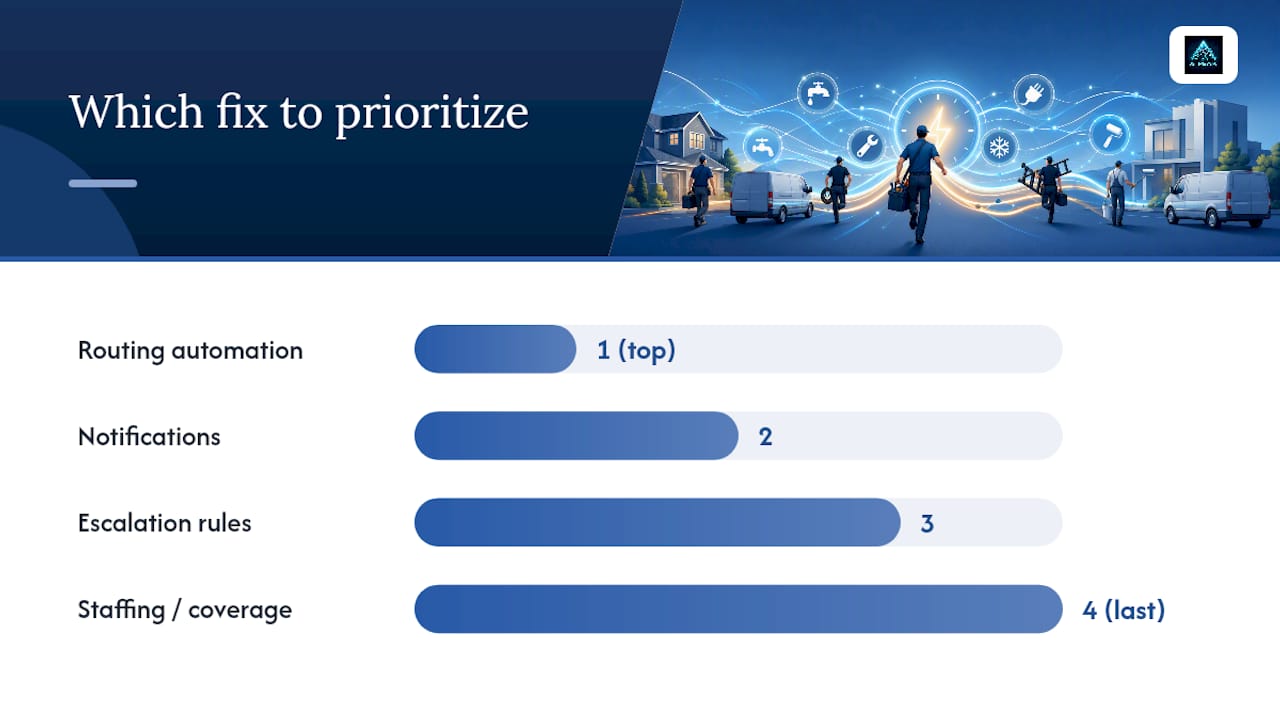
- Manual routing. A lead lands in a shared inbox or generic queue, and nobody claims it until someone happens to check. This is the single most common blocker, and it's confirmed repeatedly across operational research on the topic.
- Timezone and staffing gaps. Leads arrive at 9 p.m. or on a Saturday, and no one is scheduled to catch them until Monday morning.
- Poor or missing notifications. A rep gets a single email alert buried under forty other emails, and never sees it until hours later.
- Overloaded reps. Even with instant routing, a rep already juggling six live conversations can't realistically respond to a seventh in under five minutes.
Fix these roughly in this order: routing first, since automated assignment costs little to implement and removes the biggest single delay. Notifications second, because a rep who's assigned a lead but never alerted properly might as well not have been assigned it at all. Escalation rules third, to catch the leads that slip through even after routing and notifications are fixed. Staffing last, since adding headcount or after-hours coverage is the most expensive fix and should only be necessary once the cheaper fixes have been exhausted.
To confirm a fix actually worked, don't just assume it did. Run a two-week before-and-after comparison on median response time and percent-under-SLA for the specific segment you changed. If routing automation was the fix, you should see the median drop within days, not weeks. If it doesn't move, the real blocker was probably notifications or staffing all along, and you'll want to test that next.
Pro Tip: If you can only fix one blocker this quarter, fix notifications. It's the cheapest change on this list and it exposes exactly how much of your delay is routing versus attention, which tells you where to spend your next dollar.
What Should You Look for in a Speed to Lead Tool?
Rather than chasing specific vendor names, evaluate any tool or workflow against a fixed checklist of capabilities that actually move your response time.
- Automated routing by territory, service line, or round robin, with zero manual claim step required.
- Calendar embedding on forms and thank-you pages so leads can self-schedule immediately.
- Real-time multi-channel alerts, not just email, pushed to mobile and team chat tools simultaneously.
- Spam and bot filtering at the point of submission, before a lead ever reaches a rep's queue.
- Escalation logic that reassigns or alerts a manager automatically if the first response window is missed.
- After-hours fallback, an automated but genuinely useful response (scheduling link, relevant resource, or a text confirming a callback window) rather than a generic "we'll be in touch."
A workable end-to-end flow looks like this: prospect submits a form, enrichment fills in missing details automatically, routing assigns the lead within seconds, a multi-channel alert reaches the rep's phone and team chat at once, and the prospect either books directly on a calendar or receives a human response inside the target SLA window. Every one of those integration points needs to talk to your CRM in real time, otherwise you're just moving the bottleneck downstream instead of removing it. For teams weighing custom-built reporting or a formula field that standard CRM tools don't support out of the box, a custom CRM integration partner can build the exact instrumentation your dashboard needs. And if your leads are coming from local search, pairing faster response with stronger local search visibility means more of those leads arrive in the first place.
How AI Peak Biz Applies Speed to Lead in Practice
Many service businesses lose revenue not because their marketing fails, but because their phones go unanswered and their forms sit untouched for hours. An AI system can answer calls and texts the moment they come in, qualify the lead, and book the appointment directly on the calendar, day or night. That's the calendar-embedding and instant-routing playbook described above, running automatically instead of depending on a rep being at their desk.
We've written about why this matters specifically for service businesses competing on response time, where a five-minute callback often decides who gets the job before either company has finished the sales pitch. If you want to see what slow response is actually costing you in dollar terms, run your numbers through our missed-call revenue calculator. Most owners are surprised by the total.
What I'd Tell You Before You Roll This Out
Start with one form or one lead segment, not your entire pipeline. Pick your highest-intent form, fix routing and notifications there, measure for two weeks, and only then expand to the rest of your funnel. Trying to overhaul every channel at once is how these projects stall out.
Pair your speed metric with a quality metric from day one. Speed alone can be gamed, a rep can "claim" a lead in ten seconds and then do nothing useful with it for an hour. Track response time and conversion rate together, or you'll optimize for a number that looks good on a dashboard and means nothing in revenue.
The most common rollout mistake I see is treating this as a one-time fix instead of an ongoing discipline. Response times drift back up within a quarter if nobody's auditing them weekly. Build the habit, not just the workflow.
Ready to Stop Losing Leads to Slower Competitors?
Every fix in this article, faster routing, calendar embedding, instant notifications, still depends on someone or something being available the second a lead comes in. Some AI solutions help close that last gap by answering calls 24 hours a day, so prospects are less likely to sit in a queue waiting for a human to notice them.
Our AI voice assistant picks up calls your team misses and qualifies the caller on the spot, while our AI appointment setter books the meeting directly onto your calendar without a single manual handoff. If web chat is where you're losing leads, our AI chatbot keeps that channel staffed around the clock instead of going quiet after business hours. Check pricing to see which plan fits your call volume, or run your numbers through the missed-call revenue calculator first to see exactly what slow response is costing you this month.
Sources
- Speed to Lead Benchmarks and Optimization | RevOps Report
- The short life of online sales leads | Harvard Business Review
- What Is Speed to Lead and Why It Still Matters | Chili Piper
Recommended
- Speed to Lead: Why Responding in 5 Minutes Wins the Job
- AI Peak Biz: The All-In-One AI Platform for Local Businesses
FAQ
What Does Speed to Lead Mean?
Speed to lead is the time between a prospect's first inbound action, a form submission, call, or chat message, and your first meaningful response. The benchmark for high-intent leads is under 5 minutes, ideally under 2.
How Important Is Speed to Lead?
It's one of the highest-leverage metrics in sales because, in the InsideSales.com and MIT lead response research, leads contacted within five minutes qualified roughly 21 times more often than those contacted after 30 minutes.
What's a Good Speed to Lead Benchmark by Channel?
High-intent leads should be contacted within 5 minutes, mid-intent leads within 1 hour, low-intent leads within 24 hours, and live chat within 60 seconds.
Can Automation Actually Improve Speed to Lead?
Yes. Automated routing, calendar embedding, and instant multi-channel notifications remove the manual bottlenecks that cause most delays, and tools like AI Peak Biz's AI voice assistant and appointment setter can answer and qualify leads fast, around the clock.
How Do I Measure Speed to Lead Correctly?
Timestamp from the form-submission moment, not the CRM entry, build a "minutes to first touch" formula field, and report the median rather than the average to avoid outlier skew.