
By AI Peak Biz Team · October 16, 2026
Web Chat: Contractors Must Keep Crew Talk Separate From Lead Capture

Contractors should add web chat as an extra channel, but only when someone answers fast or reliable automation covers the gaps. Used well, it catches after-hours and text-preferring leads and keeps crew communication tied to each job. Keep team chat and customer chat separate, and route every customer conversation into your CRM or unified inbox so fewer leads sit unseen overnight.
TL;DR:
- Keep crew conversations tied to jobs with searchable approvals, photo sharing, permissions, and mobile access; customer chat captures website leads but cannot replace team tools.
- PipelineOn reports phone calls convert 25 to 30% into booked jobs, versus 10 to 15% for forms and 8 to 12% for chat, so treat chat as an added channel.
- Fast replies matter, so assign live coverage or promise a specific morning callback for overnight chats.
- Send every chat to a CRM or unified inbox, and collect the visitor's name, requested service, location, callback window, and permission to call or text.
- Pilot chat during limited hours for a few weeks, track response speed and booked jobs, then expand coverage or add automation based on results.
Table of Contents
- What does web chat actually do for a contracting business?
- Which features matter most in team and project chat?
- How does web chat capture leads, even after hours?
- How fast do you need to respond, and who covers the chat?
- How should you choose and integrate a web chat tool?
- What proof backs up this advice?
- Why chat deserves to be a growth channel, not a checkbox
- How we help contractors capture chat leads around the clock
- Sources
What does web chat actually do for a contracting business?
Chat plays two different jobs, and mixing them up is where most contractors go wrong. One job is internal: keeping crews, subs and office staff aligned. The other is external: talking to people who land on your website.
Project or team chat keeps photos, approvals and decisions attached to a specific job. Instead of hunting through scattered texts to find who approved the change order, you open the job and read the thread.
Customer-facing web chat catches visitors browsing your site, answers common questions and shines after hours, when nobody is picking up the phone.
Each channel has a role:
- Phone: best for urgent scheduling and emergencies.
- Forms: suited to low-intent research, such as a homeowner gathering rough quotes.
- Customer chat: instant, low-friction engagement for people who would never call or fill out a form.
- Team chat: the shared record of what the crew decided and why.
Treat these as four tools, not one product. A platform that does only team chat will not capture a single lead, and a lead-capture widget will not help your foreman share a photo of a rotted joist.
Which features matter most in team and project chat?
For jobsite and office collaboration, look for features that cut down on lost context. PlanMan describes automatic chat rooms for each project, staff tagging, and notification controls that let people subscribe to the updates they care about. That is the model to look for: the conversation lives with the job.
Contractors Cloud documents a built-in team chat that supports one-to-one and group messaging for crews and teams. Because crews work from trucks and driveways, a phone app matters too, and Contractors Cloud lists a mobile app on the Apple App Store.
Your checklist:
- Chat rooms tied to each job, with tagging for subs and crew members.
- Photo and media upload with simple markup, so a circled problem area needs no explanation.
- A searchable history of decisions and approvals.
- Permission settings that limit who sees which job.
- Group chats for crews and notification controls that avoid pinging everyone about everything.
Pro Tip: Before you commit, ask a foreman to find an older decision using only the search bar. If it takes too long, the history feature may not be good enough.
How does web chat capture leads, even after hours?
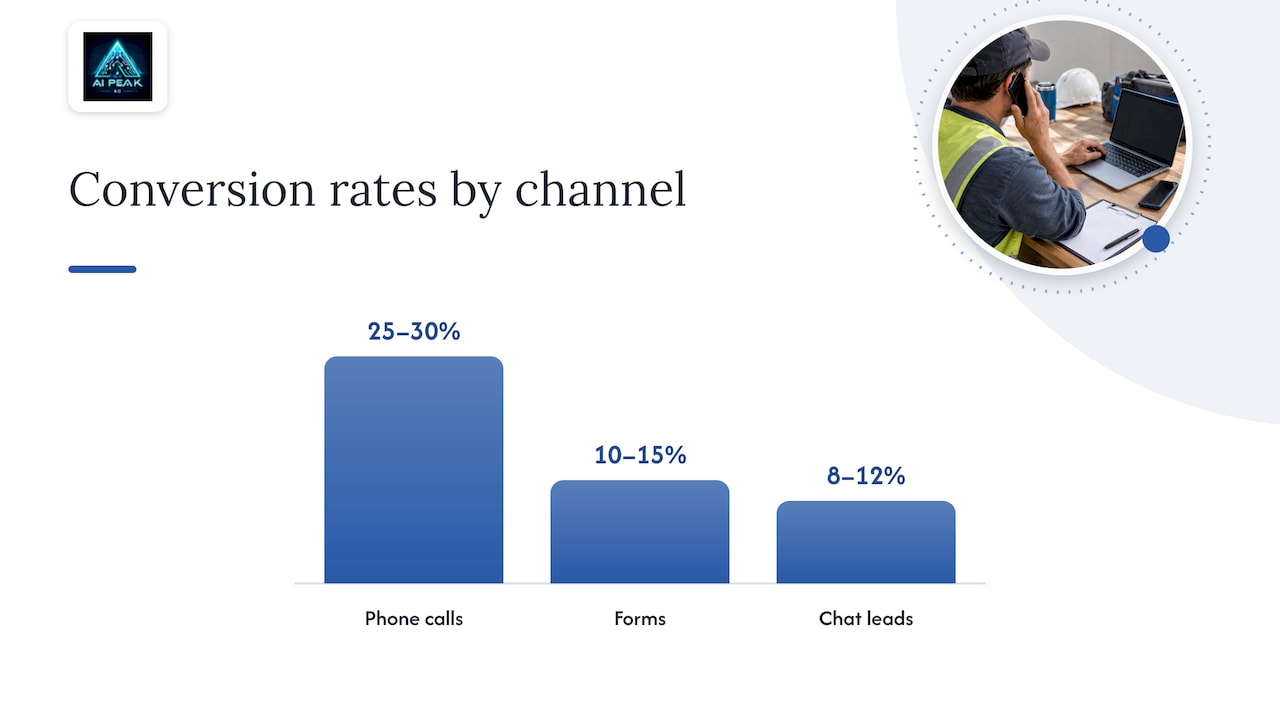
Chat reaches the visitors who will not call and will not complete a form. According to PipelineOn's comparison of forms, chat and calls, phone calls convert to booked jobs at 25 to 30% versus 10 to 15% for forms, while chat leads convert lower, typically 8 to 12%, but arrive in high volume after hours. Chat is not a replacement for the phone. It is a net for traffic you would otherwise lose.
A bot-assisted chat can do the first-touch work while you sleep:
- Greet the visitor and ask what service they need.
- Capture a name, phone number and address or ZIP.
- Offer a clear next step, such as "Someone will call you in the morning."
- Pass the conversation to a human when one is available.
The part contractors skip is routing. A captured lead that lands in a dead inbox is the same as a missed call. Send every chat into your CRM or unified inbox, tag it by source, and sort it for same-day or next-morning follow-up so someone owns it.
Bot-assisted chat can capture contact details for morning follow-up, which keeps after-hours visitors from slipping away.
How fast do you need to respond, and who covers the chat?
Speed matters. Delayed responses erase the advantage chat offers. Set a response target you can hold during business hours, and a firm callback time for anything that arrives overnight.
You have four ways to cover the chat:
- Internal rotation: office staff take turns watching the widget.
- Scheduled coverage: chat is live only during set hours, with a bot or form outside them.
- AI triage plus morning human follow-up: automation captures the lead, a person calls first thing.
- A managed answering service: a third party handles conversations for you.
Whichever you pick, make the first exchange count. Collect these five items before anything else:
- Name
- Service needed
- Service address or ZIP
- Best callback window
- Permission to call or text
Pro Tip: Write the callback promise into the bot's greeting and then honor it. A clear callback commitment builds more trust than "soon."
How should you choose and integrate a web chat tool?
Start from the problem, not the vendor's demo. A short selection checklist:
- Team chat and customer chat are handled as separate things.
- Crews can use it comfortably on a phone.
- Photos upload and display without fuss.
- Permission controls limit who sees what.
- History is searchable.
Then prioritize integrations in this order. First, unified inbox or CRM sync, because a chat that does not land in your pipeline is wasted. Second, appointment booking directly from the conversation. Third, lead tagging and reporting by channel, so you can see whether chat is earning its keep. Fourth, a clean handoff from bot to human.
Ask every vendor four questions: What is your uptime record? How fast is the human handoff? Who owns the conversation data? What onboarding help do you provide?
Your website also has to carry its weight once visitors arrive. Picshaw's contractor website checks are a useful readiness list to run before you pay for more traffic.
What proof backs up this advice?
Our advice here comes from the problems we solve every day for service businesses that lose revenue to missed calls and slow follow-up. Here is what stands behind it:
- Our Ascent plan includes an AI voice agent that answers calls and books appointments by phone, and Summit adds missed-call text back that can reply within moments.
- We run a unified inbox that brings SMS, web chat, email, Facebook Messenger, Instagram and Google Business Profile into one place.
- We handle onboarding and setup hands-on, so you are not left alone with software.
- Our work centers on local service businesses such as HVAC, plumbing, roofing, landscaping and home-service contractors.
We set out the operating rules above because chat tends to break down in the same places: slow replies, leads with no owner, and tools that never connect to the rest of the business.
Why chat deserves to be a growth channel, not a checkbox
Too many contractors install a chat bubble, forget it, and decide chat "doesn't work." I think that gets it backward. Chat only looks weak when nobody is watching it. A lead who messages in the evening and hears back much later may already have called someone else.
My advice is to pilot it. Run chat during limited hours for a few weeks, track how quickly you respond and how many chats become booked jobs, then widen coverage or add automation based on what you see.
How we help contractors capture chat leads around the clock
We built our platform for the exact gap this article describes. Our Ascent plan's AI voice agent can answer calls and book appointments by phone, and conversations land in one unified inbox, so a visitor who reaches out after hours can get a response instead of silence. Our team sets it up with you directly, so your crew gets hands-on setup support.
You can see how it fits your business on our AI Peak Biz plans page, where current details are available.
Sources
FAQ
What is the best live chat software for contractors?
The best choice is the one that fits the job you need done. For crew communication, pick a project-tied tool with photo sharing and search. For customer leads, pick one that routes chats into your CRM or unified inbox and can reply automatically after hours.
How do you communicate with a contractor?
Agree on one main channel at the start and keep decisions in writing. Project chat works well because messages and photos stay attached to the job, so nobody has to dig through texts later.
Is there an app for contractors?
Yes. Contractors Cloud lists a mobile app on the Apple App Store for contractor chat and project management. Check that any app you choose works well on phones and keeps conversations tied to each job.
How do you tell a contractor you are unhappy with their work?
Be specific and put it in writing, with dated photos of the issue. A project chat thread makes this easier, since it holds the original agreement and every approval in one searchable place.