
By AI Peak Biz Team · October 6, 2026
Stop Late Appointments: Booking Buffer Times With Operational Rules

Buffer time is the intentional gap you place between appointments to absorb overruns, travel, cleanup, or notes, and it protects your whole schedule from a single late appointment knocking over the rest of your day. The fastest fix is simple: add a 5 to 15 minute buffer to each slot, or if you need your calendar to actually block that time, extend the service duration itself. Many booking systems only limit when a new appointment can start and never stretch the calendar event to match, so check that distinction before you trust your calendar.
TL;DR:
- Adding a buffer of 5 to 15 minutes helps absorb overruns, travel, and cleanup, preventing delays from cascading into the rest of the day.
- The optimal buffer length depends on service complexity, space turnover, travel time, and the time of day, with specific recommendations for different appointment types.
- Most booking platforms require adjustments to service duration or automation to ensure buffers are visibly blocked and effective in practice.
- Regularly measure on-time start rates and overrun frequency over 2 to 4 weeks to refine buffer settings and improve schedule reliability.
- Automating appointment handling and buffer enforcement becomes essential for managing multiple staff calendars and preventing missed leads at higher booking volumes.
Table of Contents
- What buffer time is and why it matters for appointments
- How to pick the right buffer length for each service
- How buffer settings actually work in scheduling systems
- Troubleshooting common buffer problems and fixes
- Measure and adjust buffers: the metrics and cadence
- Author perspective: operational trade-offs and when automation helps
- AI Peak Biz: enforcing buffer protections and recovering missed leads
- Sources
What buffer time is and why it matters for appointments
A buffer is the deliberate space between two bookings, and it earns its place on your calendar by doing four jobs at once: giving you time to clean a room or reset equipment, travel between job sites, jot notes while details are fresh, and absorb a session that runs long. Without that space, one overrun pushes into the next appointment, and that one pushes into the next, until your 9 AM delay becomes a 4 PM apology.
Buffers matter because overruns are common, not rare. Appointments run past their allotted time on a regular enough basis that a zero-buffer schedule is structurally fragile rather than merely tight.
A small, non-zero buffer changes the schedule efficiency and reliability substantially:
- It absorbs the occasional long appointment without touching the next client.
- It gives you a few minutes to reset, rather than starting the next job already behind.
- It keeps a single bad morning from compounding into a bad week.
Buffers running 5 to 15 minutes are the baseline that works for most service businesses, balancing a small loss of bookable capacity against a real gain in reliability.
How to pick the right buffer length for each service
The right buffer depends on four things: how complex the task is, how much physical turnover the space needs, how far you travel between appointments, and where the slot falls in your energy curve during the day. A quick trim needs less recovery time than a color treatment. A home visit needs more than a desk-based call.
Rough starting points by service type:
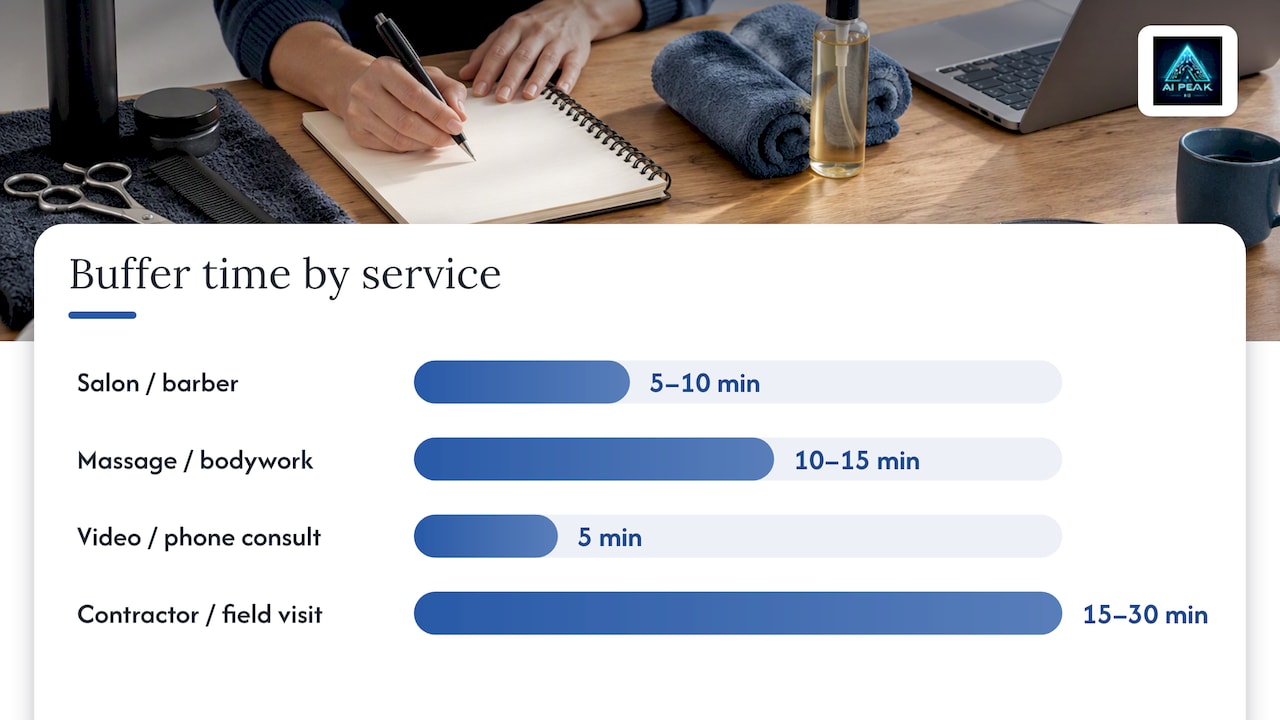
- Salon or barber services: 5 to 10 minutes for cleanup and restocking between chairs.
- Massage or bodywork: 10 to 15 minutes for linens, room reset, and a short break.
- Video or phone consultations: 5 minutes is usually enough since there is no physical reset.
- Contractor or field visits: 15 to 30 minutes or more to cover drive time and unpacking tools.
Unfamiliar or dependency-heavy work deserves extra room. Scaling buffers by task complexity and adding roughly 25% more time for unfamiliar work keeps your schedule honest instead of optimistic.
You also have a choice of pattern: a fixed buffer after every single appointment, or batching several appointments together and placing one longer buffer at the end. The first suits a solo provider seeing one client at a time. The second suits workflows where tasks naturally cluster, like back-to-back phone consultations that share setup.
Pro Tip: Run your new buffer setting for one to two weeks, then check whether appointments are still starting late before you assume the number is right.
How buffer settings actually work in scheduling systems
Most booking platforms, regardless of brand, expose a similar set of controls once you go looking for them.
- Buffer before and after: separate settings for padding time before an appointment starts and after it ends.
- Minimum scheduling notice: a related but distinct setting that controls how soon someone can book, not how much space surrounds the booking.
- Show as busy: a toggle that determines whether the buffer itself appears as blocked time to anyone else viewing your calendar.
- Service duration versus buffer: the core distinction, since duration is what shows on the calendar and buffer is often just a scheduling rule layered on top.
Google Calendar, for example, includes a dedicated buffer time option in its booked appointment settings, letting you add space between bookings and cap how many appointments land in a single day.
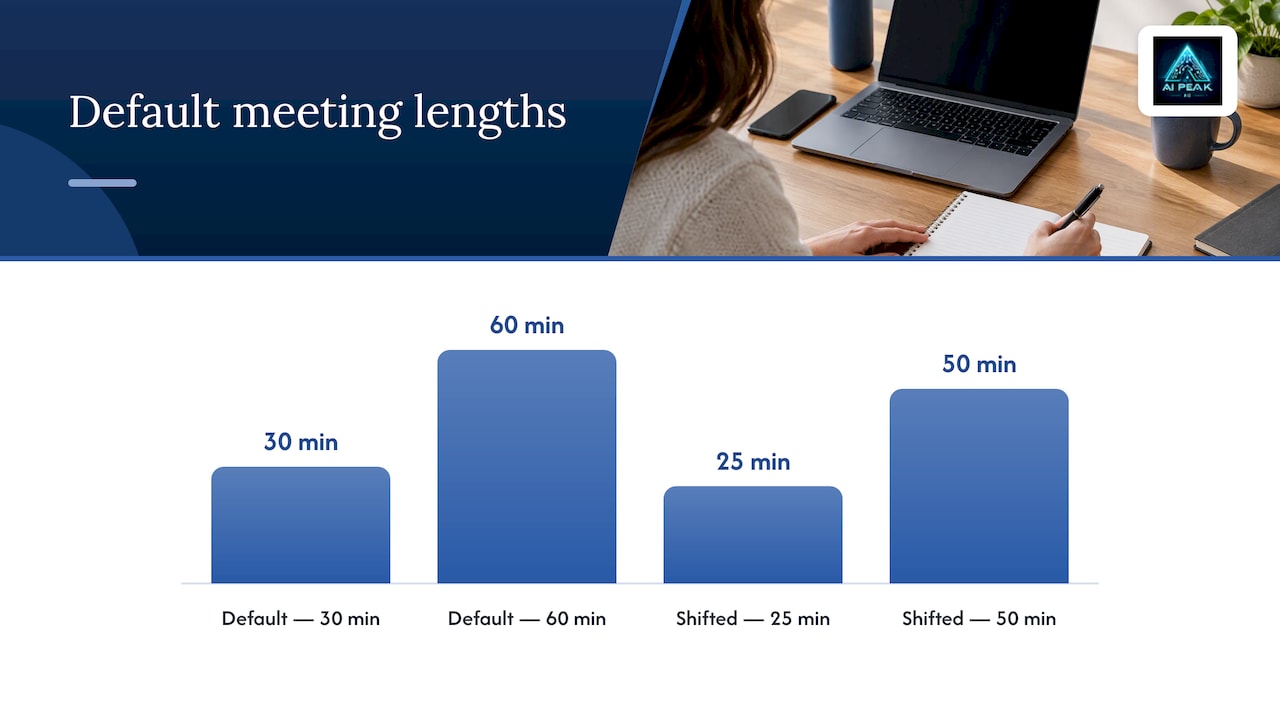
If you need the calendar event itself to visually block the buffer minutes, your two real options are extending the service duration to include that time, or using automation to update the event after it is booked. One setting change worth making regardless: shifting default meeting lengths from 30 and 60 minutes to 25 and 50 minutes builds a transition gap into every meeting automatically, with no manual buffer management required.
Pro Tip: Label every buffer block clearly and set it to "busy" so teammates sharing your calendar don't book over it thinking it's open time.
Troubleshooting common buffer problems and fixes
The most common complaint about buffer time is that it does not actually appear to block anything on the calendar, and the root cause is usually simple: many systems use the buffer only to restrict which start times a customer can choose, without ever extending the booked event's duration. The buffer exists as a rule, not as visible time.
A few fixes address this directly:
- Set the service duration itself to include the buffer minutes, so the event block matches reality.
- Use workflow automation to extend or adjust the calendar event after a booking is confirmed.
- Confirm that "show as busy" is enforced on every staff member's calendar, not just your own.
- Check calendar integration settings if multiple calendars or booking tools are involved, since a sync gap can let buffers disappear between systems.
To test whether your scheduler actually blocks buffers, book a test appointment, then try to book a second one immediately after it. If the system lets the second booking land inside what should be buffer time, your buffer is gating start times only, not extending the event, and you need one of the fixes above.
Measure and adjust buffers: the metrics and cadence
Treat your buffer length as a setting to tune, not a number to set once and forget. Three metrics tell you whether it is working:
- On-time start rate: the share of appointments that begin when scheduled.
- Overrun frequency: how often sessions run past their allotted time.
- Buffer utilization: how often the buffer is actually used versus sitting empty.
Run this check over a 2 to 4 week window using a simple calendar audit or a log you update after each appointment. If the buffer goes unused for four straight weeks, trim 5 minutes back and reclaim that capacity.
Author perspective: operational trade-offs and when automation helps
Manual buffer rules work fine when you are the only one managing a calendar and the volume is low enough to adjust by feel. The trouble starts when you are managing several staff calendars, fielding missed calls while already mid-appointment, and trying to enforce consistent buffer rules across all of it by hand.
That is the point where automated appointment handling starts to pay for itself: it enforces busy blocks consistently, confirms bookings without your attention, and catches leads you would otherwise lose while on a job. If the time you spend policing your own calendar costs more than the capacity a buffer "costs" you, automation is worth a serious look.
AI Peak Biz: enforcing buffer protections and recovering missed leads
Our platform is designed to address the gap between a buffer rule you set once and a calendar that actually honors it every day. On our Ascent plan, an AI voice agent can answer calls and book appointments by phone, so a buffer you configure can stay enforced even when you're mid-job and can't manage the calendar yourself.
A unified inbox pulls in SMS, web chat, email, and social messages, so confirmations and follow-ups happen automatically instead of competing with your actual appointments. A lot of revenue quietly slips away from missed calls and slow responses, which is exactly the pressure that good buffer management is trying to relieve in the first place.
Plans start with AI Website at $197 per month, with Base Camp, Ascent, and Summit tiers available as your booking volume grows. Visit AI Peak Biz to see which plan fits your schedule.
Sources
FAQ
What is a buffer time in Bookings?
Buffer time in a booking system is a scheduling rule that adds padding before or after an appointment slot, typically 5 to 15 minutes. It restricts when the next appointment can start, though it may not always extend the visible calendar event to match.
What does buffer time mean?
Buffer time means an intentional, unbooked gap placed around an appointment to absorb overruns, travel, or cleanup. It exists specifically to stop one delay from cascading into every appointment that follows it.
What is the minimum lead time for Bookings?
Minimum lead time controls how soon before an appointment someone is allowed to book it, which is a separate setting from buffer time. Buffer time governs space between appointments, while lead time governs how last-minute a new booking can be.
What does buffer mean in calendar?
In calendar tools like Google Calendar's booked appointment settings, a buffer is a setting that adds space between bookings and can limit how many appointments land in a single day. Whether that buffer shows as a blocked event depends on the specific tool and whether service duration was set to include it.