
By AI Peak Biz Team · September 27, 2026
Recover Missed Leads: Consent-First Client Intake Automation for Local Pros

Yes: AI-driven call and text automation can capture missed leads, qualify them, and book appointments automatically, recovering revenue without adding staff. Speed matters more than most owners realize, and regulators now require clear disclosure whenever AI handles a call or text. If you want the short version, skip to the implementation checklist below and start there.
TL;DR:
- AI-driven automation can recover missed leads by responding within 60 seconds via text and booking appointments within 15 minutes, increasing booking odds.
- Proper setup requires mapping intake sources, testing integrations, and providing clear disclosures to comply with FCC regulations on AI use.
- Ensuring smooth calendar and CRM connections, along with staff response SLAs, prevents lead loss due to technical failures or delayed human follow-up.
- Businesses should monitor response times, booking conversions, and missed-call recovery rates during a 30-day trial to optimize performance.
- Vendor onboarding must include live testing, reporting dashboards, and training, with costs typically starting around $197 per month, plus usage fees.
Table of Contents
- How client intake automation works: components and data flow
- Step-by-step setup checklist: scripts, consent, integrations, testing, and staffing
- Metrics to track and a 30-day testing plan
- Common problems when automating intake and pragmatic fixes
- What good vendor onboarding and support actually look like
- Why AI Peak Biz makes this simple to start
- Sources
How client intake automation works: components and data flow
Client intake automation is not one tool but can be enhanced by white-label AI services and automation best practices that streamline intake workflows. It is a set of connected pieces that catch a lead the moment they reach out and carry them through to a booked appointment.
The core components look like this:
- AI voice agent: answers calls and books appointments by phone.
- Missed-call text-back: fires an automatic text within moments of an unanswered call so the lead hears from you even if no one picks up.
- Two-way SMS: lets a prospect confirm, reschedule, or ask a follow-up question without ever picking up the phone.
- Web chat: captures site visitors who would otherwise leave without calling.
- Unified inbox: pulls texts, chats, and social messages into one place so nothing gets missed across channels.
- CRM and calendar sync: writes the lead's details straight into your pipeline and books the slot on your live schedule.
The flow itself is simple in concept. A call or text comes in, the AI system identifies who is calling and why, asks a short set of qualifying questions, and either books the appointment directly or hands the conversation to a staff member when the request falls outside the AI's scope. Before any of this goes live, confirm three technical points: that your phone number's usage supports AI call handling, that the API or webhook connection between your intake tool and your calendar is stable, and that your calendar is properly tokenized so bookings do not double up or vanish. A reliable lead routing setup is what keeps this whole chain from breaking under real call volume.
Step-by-step setup checklist: scripts, consent, integrations, testing, and staffing
Launching client intake automation works best as an ordered process rather than a scramble to turn everything on at once.
- Map your intake sources and required fields. List every channel a lead might use, phone, text, web form, chat, and decide what information each one must capture before a booking counts as qualified.
- Choose your integration endpoints. Confirm which CRM and calendar the automation writes to, and test that a test lead actually lands in both.
- Write first-touch scripts. Keep the AI voice and text scripts short: a greeting, one or two qualifying questions, and a clear next step.
- Build confirmation and reschedule templates. Every booked appointment should trigger a confirmation text, and every reschedule request should route back into the same flow.
- Add consent capture on every web form. A checkbox or clear statement at the point of submission satisfies the FCC's consent requirement for AI-assisted outreach.
- Disclose AI at the start of every call. The FCC has confirmed that the TCPA applies to AI-generated voices, which means callers must hear that they are speaking with an automated system before the conversation continues.
- Handle healthcare intake separately. If you run a medical or dental practice, require a signed Business Associate Agreement with your vendor, keep message content to the minimum necessary, and document each patient's preferred contact method.
- Test every channel under pressure. Simulate a lead calling at 11 p.m. on a Saturday and another texting "STOP" mid-conversation to confirm opt-outs are honored instantly.
- Assign monitoring roles and SLAs. Decide who gets notified when a lead needs a human, and set a response window they are expected to meet.
Pro Tip: Run your night and weekend tests before your first real lead ever hits the system. It is far cheaper to catch a broken calendar sync in a simulation than to lose a booked job because of it.
Metrics to track and a 30-day testing plan
You cannot tell if intake automation is working without a baseline. Pull your last 90 days of call logs and CRM entries before you flip anything on.
Track four numbers weekly:
- Average first response time: how long between a lead's first contact and your first reply.
- Lead-to-booked conversion rate: the share of qualified leads that end up on your calendar.
- Booked appointments per week: a simple volume check against your pre-automation average.
- Missed-call recovery rate: how many unanswered calls convert to a text conversation and then a booking.
A common industry target is a first text reply within 60 seconds of a missed call and a live call attempt within 15 minutes, both of which research and practitioner case data tie to sharply higher booking odds in home services. Run the automation for 30 days, check these four numbers every week, and watch for stalled conversion. If response time is fast but bookings are not climbing, the problem usually sits in your script or follow-up cadence, not the technology itself.
Common problems when automating intake and pragmatic fixes
Most intake automation failures trace back to a handful of predictable causes, and each has a straightforward fix.
- Too much friction at booking: if a lead has to jump through several steps to lock in a time, offer a provisional slot immediately and follow up with a short callback window to confirm.
- Consent or disclosure gaps: capture consent at the point of form submission and open every AI call with a disclosure statement, in line with FCC guidance on AI voice technology.
- Integration failures that quietly lose leads: add duplicate detection, keep an audit log of every booking attempt, and run a heartbeat test on your CRM connection weekly.
- Staff ignoring the inbox: set push notifications, define a response SLA, and build an automatic escalation path when that SLA is missed.
A breakdown of what slow response actually costs a service business is worth reviewing if you are still convincing a partner or team that this is worth fixing.
What good vendor onboarding and support actually look like
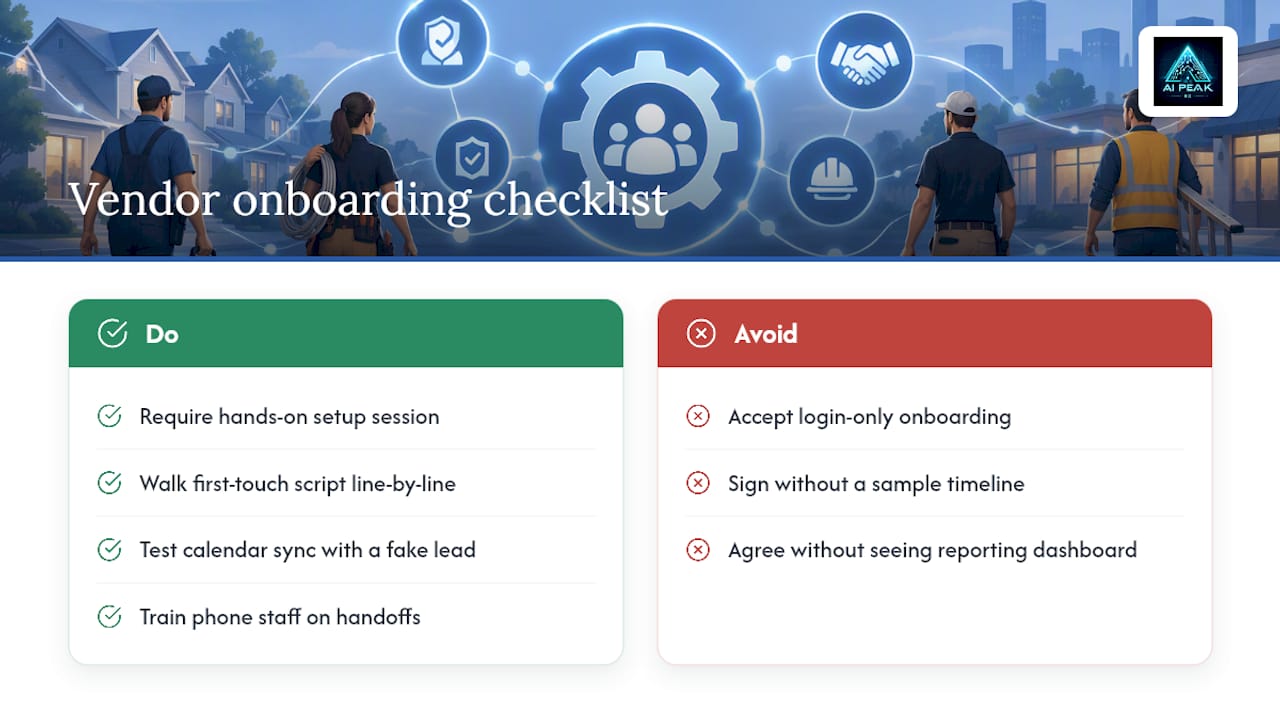
In intake rollouts, there is a big difference between a vendor who hands you a login and one who sits with you through setup. The good ones walk your first-touch script line by line, test your calendar sync with a fake lead before launch, and train whoever answers your phones on how to hand off a call the AI could not finish.
Before you sign anything, ask for a sample onboarding timeline, a walkthrough of how they handle the AI disclosure requirement, and a look at the reporting dashboard you would actually use week to week. A vendor who cannot show you that dashboard in the demo will not have it ready when you need it most.
Why AI Peak Biz makes this simple to start
If your goal is recovering missed leads and getting them booked without hiring another front desk person, an all-in-one platform can get you there faster than stitching together multiple separate tools. It combines AI call and text response, missed-call text-back, a unified inbox across SMS, chat, and social channels, and calendar booking in one system, with hands-on setup instead of just providing a login.
A trial or demo should walk you through three things:
- Onboarding and mapping: connecting your existing phone number, calendar, and CRM to the platform.
- Live testing: running a real missed-call and text scenario to confirm booking works before launch.
- KPIs to watch: first response time and lead-to-booked conversion during your first 30 days on the system.
Plans run from AI Website at $197 per month up through Summit at $597 per month, with phone and AI usage billed separately. If you run a trades or specialty service business, the storage facility front desk setup shows how the same system adapts across industries. Book a demo and see how quickly a missed call turns into a confirmed appointment.
Sources
- FCC: FCC confirms TCPA applies to AI technologies that generate human voices
- FCC Declaratory Ruling: Implications of Artificial Intelligence Technologies on Protecting Consumers from Unwanted Robocalls and Robotexts, CG Docket No. 23-362
- Lead Response Time in Home Services: What Research Shows About Speed and Booked Appointments | Now Booked Marketing
- HIPAA-Compliant Appointment Reminders: Complete 2025 Guide
Recommended
FAQ
Does TCPA apply to AI voice calls and texts?
Yes. The FCC has confirmed that the TCPA applies to AI technologies that generate human voices , which means prior express consent and clear disclosure of AI use are required before a call or text goes out.
Is texting patients appointment reminders allowed under HIPAA?
Appointment reminders are generally allowed under HIPAA as treatment communications, but the message content must stay limited to the minimum necessary information. When a vendor handles any protected health information beyond basic date and time details, a signed Business Associate Agreement is required.
How fast should a business respond to a new lead?
A common target in home services is a first automated text within about a minute of a missed call and a live call attempt within 15 minutes, both linked to meaningfully higher booking odds in industry research. Slower response consistently correlates with lower conversion, regardless of lead source.
What does client intake automation cost?
Costs vary by platform and features included, and pricing structures typically combine a monthly subscription with usage-based fees for phone and AI minutes. AI Peak Biz, for example, prices its plans from $197 to $597 per month depending on the tier, with phone and AI usage billed separately.
What happens if a lead texts STOP during an automated conversation?
Any opt-out request like "STOP" must be honored immediately, and the system should confirm the opt-out and end automated messaging to that contact. Testing this behavior before launch is a standard part of a careful rollout.