
By AI Peak Biz Team · September 16, 2026
Stop Missing Service Leads: Track Leads in CRM With a 10 Minute SLA

To reliably track leads in a CRM, capture every touch, centralize new contacts in a lead inbox, automatically qualify and route them, and log every interaction so qualified leads convert to deals. That formula (capture, centralize, qualify, route, log, convert) is the backbone of the essential CRM lead management process most service businesses copy once they stop chasing spreadsheets. The sections below give you the setup steps, scoring thresholds, SLA targets, and automation templates to make it work in practice.
TL;DR:
- Most service businesses need to automate lead capture from all sources, including website forms, ads, and chats, to avoid missed opportunities.
- Routing rules with automatic fallback are essential for ensuring leads are acknowledged within SLA windows, typically around 15 minutes.
- A simple, consistent lead scoring model combining behavioral and firmographic signals usually requires between 40 and 60 points for qualification.
- Tracking interactions continuously and auditing leads that sit untouched for over 48 hours helps monitor routing effectiveness and prevent lost deals.
- Implementing instant response automation, like immediate SMS or call scheduling, significantly reduces missed leads and improves conversion.
Table of Contents
- What Does It Mean to Track Leads in a CRM?
- How Do You Set Up Lead Tracking in a CRM Step by Step?
- What's a Good Lead Scoring Model for Qualification?
- What Response Time and Routing Rules Actually Prevent Lost Leads?
- What KPIs Should You Track for Lead Performance?
- Which Automation Recipes Actually Speed Up Follow-Up?
- How Does AI Close the Gaps Manual Tracking Misses?
- What Do Most Teams Get Wrong About Lead Tracking?
- Try Automated Lead Response Before Your Next Missed Call
- Primary Docs and Guides for Setting Up Lead Tracking
- Sources
What Does It Mean to Track Leads in a CRM?
Tracking leads in a CRM means capturing, qualifying, routing, and logging every interaction a prospect has with your business, all tied back to a single record that shows whether that lead eventually turns into revenue. It replaces the spreadsheet habit that most growing service businesses eventually outgrow, where a lead's phone call lives in one place, their email in another, and their form submission in a third tab nobody checks on Fridays.
A CRM built for lead management typically includes a handful of features that make this possible without manual data entry:
- Web-to-lead forms that push website submissions directly into a lead record instead of an inbox someone has to remember to check.
- Chat and call capture that logs conversations the moment they happen, not hours later from memory.
- Automated lead scoring that ranks incoming leads by fit and intent before a rep ever looks at them.
- An activity timeline attached to each contact, showing every call, email, text, and note in chronological order.
Lead management software that bundles these features commonly starts around $25 per user per month at the entry level, which is worth knowing if you're comparing a dedicated tool against the CRM you already pay for. The real value isn't the software fee. It's what changes on the sales floor once tracking is automatic instead of manual.
Three outcomes tend to show up fast. Contact happens sooner because reps aren't hunting for new leads across four different tools. Conversion improves because fewer leads sit untouched long enough to go cold. And attribution gets sharper, because when a deal closes, you can trace it back to the exact form, ad, or call that started it, which tells you where to spend more and where to stop.
How Do You Set Up Lead Tracking in a CRM Step by Step?
Most CRM breakdowns fail at one of five points: capture, storage, qualification, routing, or history. Fix all five and lead tracking stops being a manual chore. Here's the sequence that works across most platforms, adapted from the standard CRM lead management workflow.
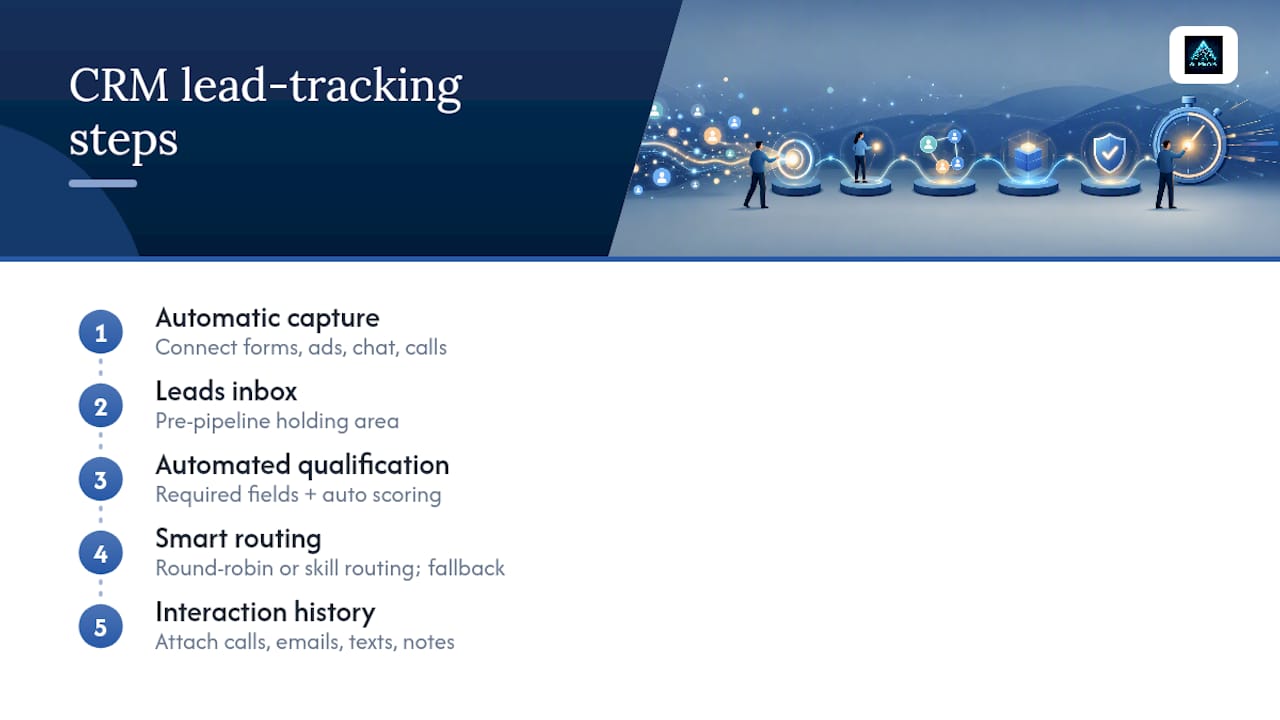
1. Build automatic capture from every source.
A lead that has to be manually typed into your CRM is a lead that sometimes never gets typed in at all. Connect your website forms, paid ad platforms, live chat widget, and call tracking number directly to your CRM's intake so nothing depends on someone remembering to enter it. Tag every source with UTM parameters at the campaign level, not just the channel level, so "Facebook ad" becomes "Facebook, spring promo, carousel creative" when you pull reports later. Set deduplication rules at this stage too. Without them, the same person filling out two forms in one week creates two competing records, and reps end up calling the same prospect twice while another lead goes untouched.
2. Route every new contact into a centralized lead inbox.
Don't let fresh leads land directly in your sales pipeline. A dedicated pre-pipeline holding area, sometimes called a leads inbox, keeps unqualified submissions from clogging the stages where your team measures forecast accuracy. Pipedrive's lead management documentation describes this pattern well: it also allows for lead recycling, where a contact that goes cold gets cycled back for a second attempt instead of being deleted outright. Build saved views and filters inside that inbox by source, score, or age so a manager can scan "leads older than 24 hours with no contact attempt" in one click.
3. Automate qualification with required fields and quick qualifiers.
Every lead record should demand a minimum set of fields (budget range, timeline, service needed, company size, whatever fits your business) before it can move forward. Pair that with two or three quick qualifying questions your form or chatbot asks upfront, and use the answers to trigger a scoring update automatically. This is where a lot of teams still rely on a rep's judgment call, which means two reps qualify the same type of lead two different ways.
4. Route and assign with clear ownership rules.
Round-robin assignment works for teams where every rep handles the same type of lead. Skill-based or territory-based routing works better when leads vary by service line or geography. Either way, build a fallback rule: if the assigned rep doesn't acknowledge the lead within a set window, it reassigns automatically instead of sitting untouched. Ownership without a fallback can result in leads being neglected in someone's queue during absences.
5. Log every interaction against the lead record.
Calls, emails, texts, and notes all need to attach to the same contact, not scatter across your phone system, your email client, and a rep's personal notebook. HubSpot's own lead management documentation shows how converting a qualified lead into a deal, while keeping that full interaction history intact, gives whoever picks it up next the full context instead of a cold restart.
Pro Tip: Run an audit once a quarter on leads that sat in your inbox for more than 48 hours with zero contact logged. That number alone will tell you whether your routing rules are actually working or just look good on paper.
Longer sales cycles make this history even more important. Cookies and analytics sessions alone can't reliably connect a lead's full path from first click to closed deal, which is why tracking interactions at the CRM level matters more the longer your typical deal takes to close.
What's a Good Lead Scoring Model for Qualification?
A workable scoring model combines behavioral signals with firmographic signals, then sets a clear point threshold that triggers action instead of just sitting in a report nobody reads. Behavioral signals track what a lead does: pages viewed, forms filled, time spent on a pricing page, whether they opened your last three emails. Firmographic signals track who they are: company size, budget range, industry, service area.
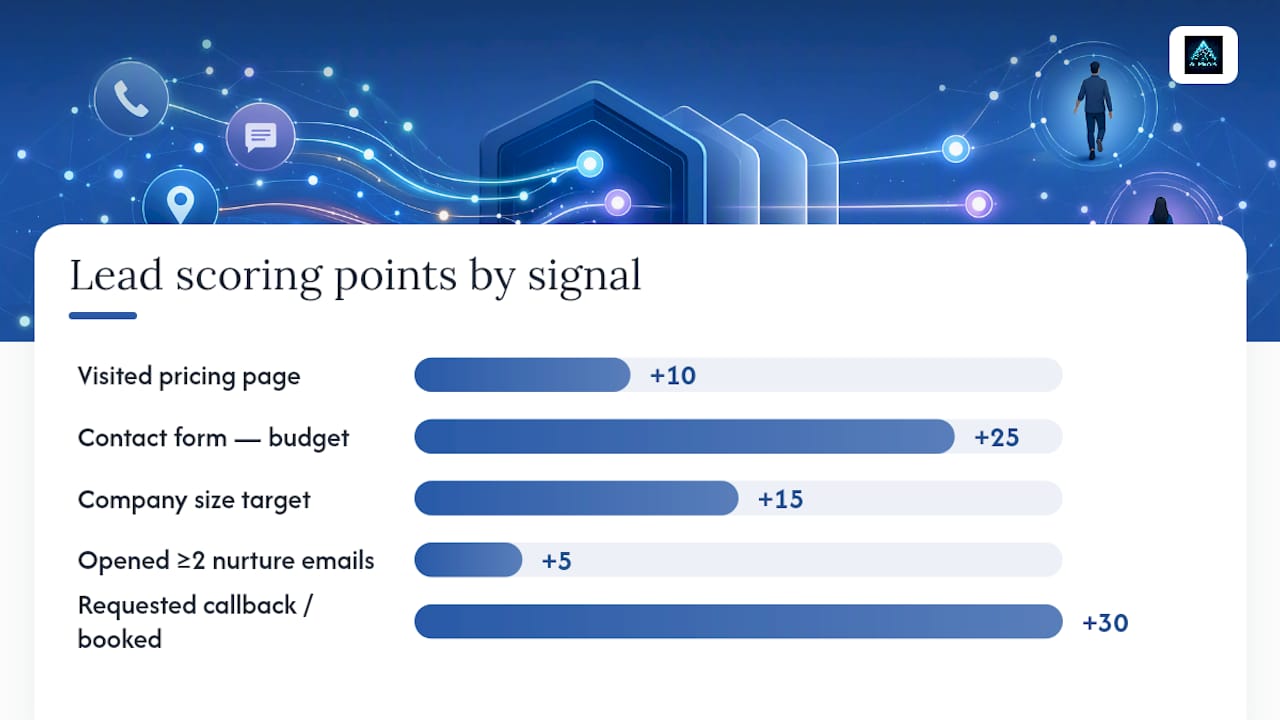
A simple starting model might look like this:
- Visited pricing page: +10 points
- Filled out a contact form with a budget field completed: +25 points
- Company size matches your target range: +15 points
- Opened two or more nurture emails: +5 points
- Requested a callback or booked a call: +30 points
Set your qualification threshold wherever the data shows leads reliably convert, often somewhere between 40 and 60 points for service businesses, though your own close-rate history should set the real number, not a template. Once a lead crosses that threshold, define what happens automatically: it converts from lead to deal, the assigned rep gets a notification, and the contact enrolls in a follow-up sequence if no human response happens within your SLA window.
Entry-level CRM platforms with built-in scoring, commonly priced starting near $25 per user per month, make this achievable without custom development. The scoring model doesn't need to be complicated to work. It needs to be consistent.
Short qualification scripts help here too. A two-question phone script ("What's driving the timeline on this?" and "Who else is involved in this decision?") gives reps a consistent way to confirm fit before they invest thirty minutes on a discovery call. Required fields at the point of capture do the same job for inbound leads that never talk to a human before qualifying. Skip this step and you'll see the classic symptom: reps complaining that half their "hot leads" from the website were never actually ready to buy.
What Response Time and Routing Rules Actually Prevent Lost Leads?
Speed decides more deals than almost any other variable in your control. A common benchmark service teams aim for is prompt contact soon after a lead comes in, with an automated follow-up sequence kicking off immediately if that window is missed. Industry guidance on lead routing and follow-up consistently points to time-to-first-contact as one of the most fixable levers in a sales process, because it's almost entirely a function of your routing setup, not your reps' talent.
Four routing models cover most situations:
- Round-robin, where leads rotate evenly across a team with similar skill sets.
- Skills-based, where leads route to whoever handles that specific service line or product.
- Geography-based, where territory determines the assigned rep.
- Value-based, where high-score leads route to your top closers while lower-score leads go to newer reps for practice reps.
Every routing model needs a failover rule. If the assigned rep doesn't acknowledge a lead within your SLA window, say 15 minutes, it escalates to a manager or reassigns to the next available rep automatically. Without that failover, one rep's bad morning becomes a lost deal that never even shows up as a mistake in your reporting.
Pro Tip: Build a task automatically the moment a lead enters the system, due in 10 minutes, with the lead's name and source right in the task title. A rep staring at a vague "follow up" task ignores it longer than one that says "Call Maria, roofing estimate request, Facebook ad."
"Lead rotting," the slow death of a contact nobody follows up on, almost never happens because a rep is lazy. It happens because no automated reminder exists to catch what a human forgot. Build reassignment rules that trigger after a set number of missed touches, and build reminders that escalate in urgency (a soft nudge at hour one, a manager alert at hour four) rather than a single notification that gets buried under twenty other alerts.
What KPIs Should You Track for Lead Performance?
Six metrics tell you almost everything about whether your lead tracking setup is actually working: lead source conversion rate, time-to-first-contact, contact rate, lead-to-opportunity rate, opportunity-to-win rate, and cost per lead. Track these by source, not just in aggregate, because a channel that generates volume but converts poorly is quietly wasting budget every month it stays untouched.
Your dashboard should surface a handful of specific widgets rather than a wall of numbers:
- A source funnel showing volume at each stage, from raw lead to closed deal, broken out by channel.
- An age distribution chart for your lead inbox, so a pile of leads sitting untouched for days becomes visible immediately.
- An SLA compliance widget tracking the percentage of leads contacted within your target window.
- Revenue by lead source, tying dollars back to the channel that originated the deal.
| Metric | What It Tells You | Watch For |
|---|---|---|
| Time-to-first-contact | Speed of initial response | Anything beyond your SLA window signals a routing gap |
| Contact rate | Percentage of leads successfully reached | Low rates often mean bad phone numbers or wrong channel |
| Lead-to-opportunity rate | Qualification effectiveness | A sudden drop suggests scoring thresholds need adjusting |
| Cost per lead | Efficiency by source | Rising costs with flat conversion means budget waste |
Activity logs feed more than reporting. Call recordings and email open data double as coaching material, letting a sales manager review exactly what a rep said on a call that converted versus one that didn't. That same data feeds attribution models, showing which touchpoints actually influenced a deal rather than just which one happened last before the close.
Which Automation Recipes Actually Speed Up Follow-Up?
Three workflows cover the majority of lead situations a service business handles, and each one can be built inside most CRMs without custom development.
- Inbound form workflow. The moment a form submits, fire an immediate SMS confirming receipt and assign the lead to a rep. Set a task for a contact attempt within 10 minutes. If the rep hasn't logged an attempt by then, escalate the task with an alert.
- Moderate-score nurture workflow. A lead that qualifies but isn't sales-ready yet enters a 7-day email nurture sequence, with a check-in call scheduled automatically if the lead shows a warm signal, like opening three emails or revisiting your pricing page.
- Missed-call text-back workflow. A missed call triggers an immediate text response, followed by a retry call schedule. If there's still no response after 48 hours, escalate to a different channel or a different rep entirely.
A short cadence template makes these easier to copy: day zero, immediate SMS and call attempt; day one, email plus second call attempt; day three, value-add content touch; day seven, final check-in before moving to long-term nurture. Pairing each step with a script keeps quality consistent. For the missed-call recipe, something as simple as "Hi, this is [name] from [business], sorry we missed you. What time works for a quick callback?" outperforms a generic voicemail because it asks for a specific next action. Lead nurturing frameworks built around consistent, timed touches tend to outperform sporadic manual follow-up by a wide margin, mostly because consistency is exactly what manual processes struggle to maintain.
How Does AI Close the Gaps Manual Tracking Misses?
Even a well-built CRM workflow has a blind spot: the lead that calls after hours, texts during a lunch rush, or reaches out when every rep is already on another call. Implementing AI or automation to answer calls and reply to missed calls quickly can reduce missed leads and book appointments outside business hours, which matters because a missed call at 7 p.m. on a Tuesday is still a lost opportunity if nobody responds until the next morning.
At a product-class level, this kind of system typically handles a few things at once:
- Instant response to calls and texts, so a prospect never hits voicemail and waits.
- Automated qualification, asking the same questions a rep would ask before the lead reaches a human.
- Direct booking, scheduling an appointment without a back-and-forth phone tag.
- A unified inbox, pulling texts, calls, web chat, and social messages into one place instead of five.
For teams building out the qualification side of this, AI Peak Biz's guide on lead qualification automation walks through setting up qualifiers that assign prospects to the right rep automatically, and the AI-driven inbound qualification guide covers how automated response and human follow-up work together instead of replacing each other.
The practical move here is small: pick one channel, whether that's after-hours calls or missed texts, set a tight SLA for it, and measure the uplift over 30 days before expanding further.
What Do Most Teams Get Wrong About Lead Tracking?
Three mistakes show up again and again once you look closely at how service businesses actually run their pipeline. The first is siloed tools: leads live in the CRM, but calls get logged in a phone system, texts happen on a personal cell phone, and none of it talks to the others. The second is no clear owner. When "the team" is responsible for a lead instead of one named person, everyone assumes someone else is handling it. The third is a manual contact rate nobody's actually measuring, so a business believes it's calling every lead within the hour when the real number, once you pull it, is closer to four hours.
The fix for all three is smaller than it sounds. Consolidate contact channels into one record. Assign single ownership with an automatic fallback. And instrument your time-to-first-contact metric before you try to improve it, because you can't fix a number you've never actually measured.
The most surprising pattern from watching this play out across service businesses: the smallest automations, a text-back trigger, a 10-minute task reminder, tend to recover the most revenue relative to the effort required to build them. Teams chase complex scoring models before fixing the basic fact that leads sit untouched for hours. Fix the speed problem first. The sophistication can come later.
Try Automated Lead Response Before Your Next Missed Call
Some platforms replace the patchwork of separate tools most service businesses stitch together, phone system, texting app, booking calendar, CRM, with one platform where an AI voice agent can pick up missed calls and missed-call text back can reply within moments.
That's the practical contrast with building this yourself piece by piece: instead of connecting five subscriptions and hoping the handoffs between them hold up, AI Peak Biz's Base Camp, Ascent, and Summit plans come with hands-on setup, so your capture, qualification, and booking workflow is set up for you instead of pieced together alone. If your team handles a specific vertical, the storage facility and financial advisor pages show how the setup adapts to different booking and qualification needs. See how it fits your lead flow by checking current plans at AI Peak Biz.
Primary Docs and Guides for Setting Up Lead Tracking
A handful of sources cover the technical and process side of CRM lead tracking well enough to work from directly:
- Lead management software overview: feature comparisons and typical entry-level pricing for dedicated lead management tools.
- CRM lead management process guide: the step-by-step capture-to-conversion framework referenced throughout this article.
- HubSpot lead management documentation: UI-level steps for saved views, filtering, and converting leads to deals.
- Pipedrive lead management features: details on lead inbox design and lead recycling patterns.
- Lead tracking strategy guide: explains why session-based analytics fall short for longer sales cycles.
Sources
Recommended
- Speed to Lead: Why Responding in 5 Minutes Wins the Job
- How Lead Response Time Affects Revenue
- Contractor Lead Follow Up Mistakes
FAQ
What Is the Best Way to Track Leads?
The most reliable method combines automatic capture from every source, a centralized lead inbox, automated scoring and routing, and a full interaction history attached to each contact. Skipping any one of those five steps tends to create the exact gaps where leads go cold.
What Are the Main Types of Leads in Sales?
Sales teams commonly sort leads by source and readiness, including cold leads, warm leads, marketing-qualified leads, sales-qualified leads, referral leads, and repeat or returning customer leads. The exact categories vary by business, but most CRMs let you tag and filter by these types to prioritize follow-up.
How Can I Track Leads in HubSpot?
HubSpot's lead records support custom saved views, filters by score or source, and one-click conversion from lead to deal once a contact qualifies, all detailed in its own lead management documentation. Interaction history, including calls, emails, and notes, stays attached to the record throughout that process.
How Do I Manage Leads in a CRM Day to Day?
Daily management means reviewing your lead inbox for anything past your SLA window, confirming routing rules assigned new leads correctly, and checking that interaction logs are current before a lead moves stages. Teams that skip this daily check tend to discover routing failures only after a lead has gone cold for days.
Does AI Peak Biz Help With Lead Tracking and Follow-Up?
AI Peak Biz answers calls and texts fast, qualifies leads automatically, and books appointments directly, which addresses the response-speed gap that causes most missed leads. Current plans and pricing are listed at AI Peak Biz.