
By AI Peak Biz Team · September 14, 2026
Cut No Shows Fast: Three Message SMS Reminders for Small Businesses

Automated SMS appointment reminders cut no-shows and pay for themselves fast, so the honest answer is yes, set them up now. Start with a three-message cadence: a confirmation at booking, a reminder at 24 to 48 hours out, and a same-day nudge, with two-way replies turned on so clients can confirm or reschedule by text. If you want this handled without touching a dashboard, a managed AI platform can run the whole sequence, answer replies, and rebook automatically.
TL;DR:
- Automatic SMS reminders can recover a significant portion of lost appointment slots, especially for businesses booking 20 or more clients weekly.
- Implementing a three-message sequence, confirmation at booking, 24 to 48 hours before, and a same-day nudge, maximizes read rates and reduces no-shows.
- Using single-word reply prompts like YES or R encourages client confirmation, boosting reply rates by minimizing decision friction.
- Two-way messaging and integration with booking platforms save staff time and enable instant rescheduling, especially when managed via AI services.
- Proper consent logging, opt-out options, and HIPAA considerations are essential for compliance, and metrics like delivery and reply rate help measure system effectiveness.
Table of Contents
- Why SMS Reminders Work and What Business Impact to Expect
- Best-Practice Reminder Sequence, Timing, and Templates
- Setting Up Integrations, Two-Way Messaging, and DIY vs. Managed Platforms
- Compliance Checklist: TCPA Basics and HIPAA Caution
- Metrics to Track and How to Benchmark Results
- When an AI-Enabled Managed Service Changes the Outcome
- Where to Start if You're Just Getting Going
- AI Peak Biz: One Platform for Confirmations, Replies, and Missed Calls
- A Few Reliable Resources for Deeper Reading
- Sources
Why SMS Reminders Work and What Business Impact to Expect
Text messages get read. Text messages tend to get read quickly, often faster than email, which is exactly why a reminder sent by text can reach a client before the appointment slips their mind. Email reminders sit in an inbox behind promotions and newsletters. A text lands on a screen a person checks within minutes.
That speed translates directly into fewer empty chairs. A salon that used to lose a Saturday slot to a forgotten haircut, or a clinic absorbing a no-show that could have gone to a waiting patient, gets that time back once reminders are automatic instead of dependent on a front-desk call.
The value goes beyond the no-show number itself:
- Fewer inbound calls asking "what time was my appointment again?"
- Faster reschedules when a client can reply instead of calling during business hours
- A more professional first impression for new customers who expect confirmation
- Less staff time spent on manual reminder calls that eat into a slow morning
Here's the number that matters most: if a service business books 20 appointments a week and some of them no-show, that can add up to a substantial number of lost appointment slots annually. Recovering a portion of those through better reminders is real revenue, not a marginal improvement.
Best-Practice Reminder Sequence, Timing, and Templates
The recommended cadence is three touches: confirm immediately at booking, remind again 24 to 48 hours before the appointment, and send a short same-day nudge a few hours ahead. Adjust the exact windows by industry. A dental office might lean on the 48-hour mark since patients plan around it; a hair salon or auto shop can lean harder on the same-day nudge since bookings are often made just days out.
Every message should hit the same checklist: the client's name, your business name, the date and time, the location or a link, and one clear action to take. Mailchimp's guidance on booking confirmations treats this as the minimum bar for any confirmation text.
Here is a cadence you can copy today:
- At booking: "Hi [Name], your appointment with [Business] is confirmed for [Date] at [Time]. Reply YES to confirm or R to reschedule."
- 24 to 48 hours before: "Reminder: your [Business] appointment is [Date] at [Time]. Reply STOP to opt out."
- Same day: "See you today at [Time], [Name]! Reply R if you need to reschedule."
- Reschedule flow trigger: "No problem, [Name]. Reply with a preferred day and we'll find a new slot."
Keep each under 160 characters where possible. Use single-word reply keywords, since short single-action prompts like Reply YES or Reply R measurably increase confirmation rates by removing friction from the decision.
Pro Tip: Match the tone to the business. A pediatric clinic can afford a warm, slightly playful line; a plumbing or HVAC service should stay brisk and factual. Testing one tone swap at a time tells you which version actually earns more replies.
Setting Up Integrations, Two-Way Messaging, and DIY vs. Managed Platforms
Most scheduling tools connect to Google Calendar, Outlook, and the major booking platforms without custom code, which means your reminder sequence can trigger the moment an appointment lands on the calendar. The setup itself often takes minutes once your account and templates are ready. Expect a verification step, though: platforms typically require phone number or business verification before you can send fully customized SMS reminders at scale, and until that clears, messages may go out from a shared or assigned number.
Two-way messaging is where the real time savings show up. A unified inbox lets a reply of "R" or "reschedule" route straight to whoever manages the calendar, instead of a client calling and waiting on hold. Twilio's developer resources show how this two-way flow gets built when a business wants full control over the logic.
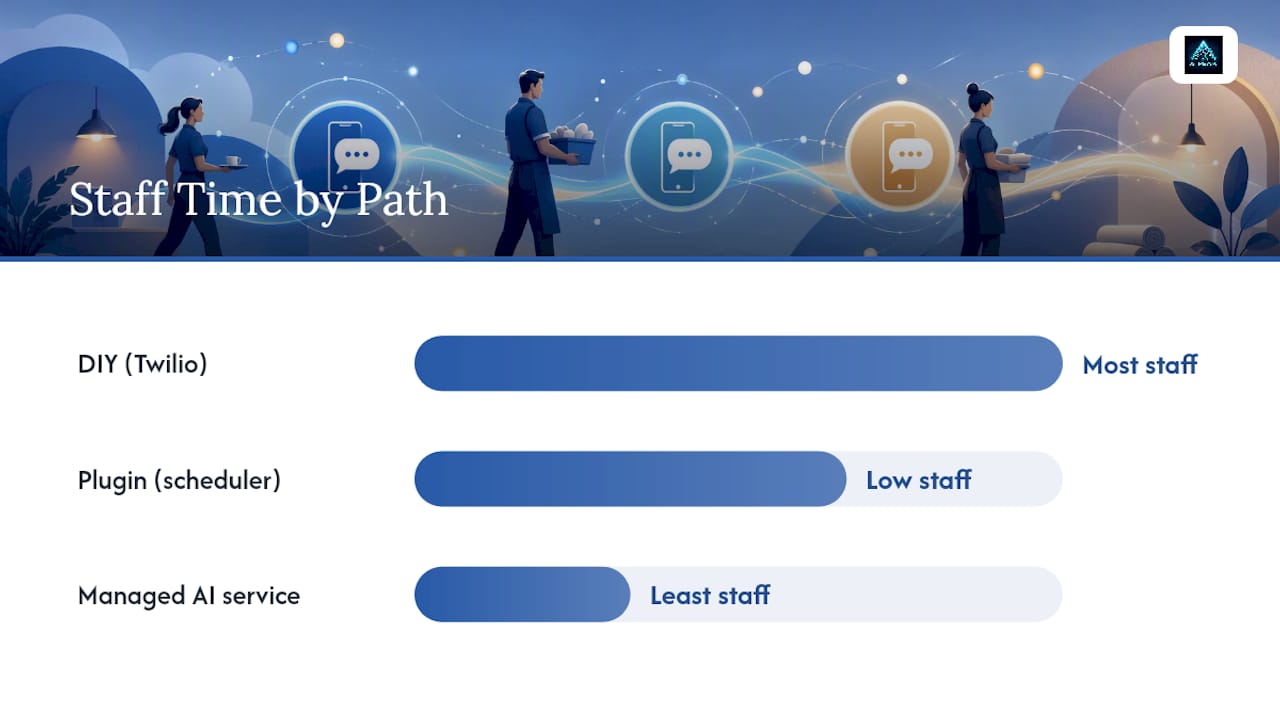
Three paths to get there:
- DIY with an SMS gateway or Twilio: most control, but requires someone comfortable with setup and ongoing maintenance.
- Plug-in through your existing scheduler: fastest path for most small teams, usually live same day.
- Managed AI service: hands-off, including reply handling and rebooking, with the least staff time required.
Compliance Checklist: TCPA Basics and HIPAA Caution
Consent is not optional. Collect it at booking, keep a record of when and how the client opted in, and include a clear opt-out on every message, since scheduling platforms generally require per-appointment opt-in before sending reminder texts.
- Log consent at the point of booking, not after the fact.
- Include "Reply STOP to opt out" on every reminder, not just the first one.
- Treat appointment reminders as transactional content; marketing texts trigger stricter consent rules.
- Keep protected health information out of plain SMS if you run a medical or dental practice, and confirm your platform supports HIPAA-appropriate messaging before sending anything beyond a basic appointment time.
One line worth remembering: a missing opt-out or an unlogged consent record is the kind of gap that only surfaces after a complaint, so build the habit before your message volume grows.
Metrics to Track and How to Benchmark Results
Four numbers tell you whether the system is working: delivery rate, reply or confirmation rate, no-show rate, and cost per message. Track them weekly, not monthly, so a broken template or a bad send time gets caught fast.
- Delivery rate: should be very high; a noticeably lower number usually points to bad numbers on file.
- Reply rate: how many clients confirm, reschedule, or cancel by text.
- No-show rate: your core success metric, compared against your pre-reminder baseline.
- Cost per message vs. recovered bookings: the actual ROI calculation.
Run a simple A/B test before committing to one template: send version A to half your list and version B to the other half for two weeks, then compare reply rates. A managed platform with built-in missed-call and follow-up tracking makes this comparison automatic instead of something you build in a spreadsheet.
When an AI-Enabled Managed Service Changes the Outcome
Basic SMS reminders solve forgetfulness. They don't solve the missed call that never gets a reminder scheduled in the first place, and slow response to a new inquiry is its own source of lost bookings. A managed AI approach closes that gap by answering the phone or text instantly, qualifying the lead, and booking the appointment before the prospect calls a competitor.
Where this shows up in practice:
- An after-hours call gets answered and booked instead of going to voicemail.
- A missed call triggers an automatic text back within seconds, not the next business day.
- A reply to a reminder gets routed and handled without a staff member checking a phone.
Pro Tip: If your team is already stretched thin on scheduling and follow-up, evaluate a managed service on how it handles the messy cases, missed calls, late replies, after-hours inquiries, not just the clean confirmation flow.
Where to Start if You're Just Getting Going
Start small: confirmation plus a 48-hour reminder, nothing else, until that alone is running cleanly. Automate the sending before you spend time perfecting wording. Once the basics hold steady, measure weekly, adjust one variable at a time, and only then consider a fuller AI-enabled system if you want the missed-call and reply-handling pieces covered too.
AI Peak Biz: One Platform for Confirmations, Replies, and Missed Calls
AI Peak Biz gives you one system for the whole problem, not just the reminder text. Instead of stitching together a scheduler, a separate texting tool, and a staff member checking replies, AI Peak Biz's AI voice agent (Ascent) can answer calls and book appointments by phone, day or night, and missed-call text back (Summit) can reply within moments, so a missed call during a busy afternoon has a better chance of turning into a filled slot.
The feature set covers appointment scheduling, a unified inbox for SMS and other channels, and automated follow-up, all built specifically for service businesses like HVAC, plumbing, salons, and clinics. Onboarding is guided, so you're not left configuring templates alone. If you're ready to see what a fully automated confirmation and missed-call recovery system looks like for your business, check the AI Peak Biz appointment setter or review current plans to find the right starting point.
A Few Reliable Resources for Deeper Reading
- Twilio's appointment reminder guides for developer-level implementation
- Acuity Scheduling's help center for opt-in and verification specifics
Sources
- Appointment confirmation text: 25+ templates by industry - Sinch (Engage)
- SMS booking confirmation - Mailchimp
- Sending appointment reminders via text: Acuity Scheduling Help Center
- Appointment reminders - Twilio
Recommended
FAQ
What Are SMS Reminders?
SMS appointment reminders are automated text messages sent to confirm, remind, or follow up on a scheduled appointment, typically triggered by a booking system or scheduling platform.
Can Text Appointment Reminders Meet HIPAA Rules?
Plain SMS can carry compliance risk for healthcare practices if messages include protected health information, so most providers keep reminder text generic (date and time only) or use a platform built for HIPAA-appropriate messaging.
How Do I Write a Reminder Text?
Keep it under 160 characters, include the client's name, business name, date, time, and one clear reply action, such as "Reply YES to confirm or R to reschedule."
What Scheduling App Sends Text Reminders?
Most modern booking platforms and calendar-connected schedulers support automated SMS reminders, and managed platforms like AI Peak Biz go further by also answering missed calls and booking new appointments automatically.