
By AI Peak Biz Team · September 26, 2026
Answer Facebook Messenger Leads in 10 Minutes for SMBs

The fastest way to generate qualified Facebook Messenger leads is to run Message (Click-to-Messenger) ads that open an automated conversational template and route responses straight to your CRM. Done right, this combination beats static lead forms on cost and engagement, but only if you respond fast. A lead who messages you expects an answer in minutes, not hours.
TL;DR:
- Effective Messenger campaigns should prioritize quick response times, ideally within 15 minutes, to maximize lead conversion and reduce drop-off.
- Using Click-to-Messenger ads with automated qualification questions can significantly lower cost-per-lead compared to static forms, especially when responses are fast.
- Routing and integrating Messenger leads into a unified, automated system helps reduce missed inquiries and maintain response speed across all channels.
- Keep qualification sequences short, with three to five quick-reply questions, and incorporate a human option to prevent abandonment.
- Monitoring key metrics such as cost per lead, response time, and conversion rates is vital for optimizing Messenger lead performance.
Table of Contents
- What Are Facebook Messenger Leads?
- Setting Up Your Campaign in Meta Ads Manager
- Turning a Chat Into a Qualified, Booked Lead
- Routing Messenger Leads So None Get Lost
- What to Measure and What Good Performance Looks Like
- Writing Messenger Copy That Actually Converts
- Your 10-Minute Launch Checklist
- Why Missed Messenger Leads Are a Bigger Problem Than They Look
- When Messenger Deserves the Lead in Your Channel Mix
- Get Messenger Leads Answered, Day or Night
- Meta Docs and Guides Worth Bookmarking
- Messenger Deserves More Respect Than It Gets
- Sources
What Are Facebook Messenger Leads?
Facebook Messenger leads are prospects who start a conversation with your business through Messenger, usually after clicking an ad, a "Send Message" button, or a comment prompt, rather than filling out a static form. That distinction matters for how you build campaigns.
Meta gives you four real paths into a Messenger conversation, and picking the wrong one for your goal is the single most common reason Messenger campaigns underperform.
Click-to-Messenger ads open a live chat the moment someone taps your ad. Because the person is already inside Messenger, you can ask qualifying questions in real time instead of hoping they finish a form. This format tends to work best when your offer needs a little explanation or your service has variables (square footage, symptoms, property type) that a flat form can't capture.
Lead Ads that click to message are a hybrid: the ad itself can send someone into an in-app form or into a chat thread, depending on how you configure the destination. Choose the chat destination when you want the conversation to continue past lead capture, for example when you plan to book an appointment inside the same thread. Choose the traditional in-ad form when your only goal is name, phone, and email with zero back-and-forth.
Sponsored Messages let you message people who have already messaged your page before, which makes them a strong tool for reactivating old leads or promoting a limited-time offer to warm contacts. They are not a cold-audience prospecting tool.
Send Message CTAs on regular page posts or organic content are the lowest-cost entry point. They work well for comment-to-message tactics, where a call to action in a post ("Comment 'PRICE' below") triggers an automated Messenger reply.
Use this quick decision guide when planning a campaign:
- Need real-time qualification before a sales call? Use Click-to-Messenger.
- Need volume at the lowest cost per lead with no nuance required? Use a standard Lead Ad form.
- Want to re-engage past inquiries or promote a flash sale? Use Sponsored Messages.
- Running organic or low-budget content and want cheap top-of-funnel volume? Use a Send Message CTA.
Click-to-Messenger ads that open a real-time chat can cut average cost-per-lead by a significant margin compared with traditional lead forms, largely because the conversational format keeps prospects engaged instead of abandoning a static field.
Setting Up Your Campaign in Meta Ads Manager
Building a working Messenger lead campaign takes about 30 to 45 minutes the first time, less once you have a template saved. Here's the order that matches Meta's own workflow.
-
Choose your campaign objective. In Ads Manager, select "Leads" as the objective, then choose "Messenger" as the destination when Meta asks where you want conversations to land. If your goal is a pure contact form with no chat, pick the "Instant Forms" destination instead.
-
Build the ad set around your qualification goal. Set your audience, budget, and placements as usual, but pay attention to the "Optimization & Delivery" section. Optimizing for "Conversations Started" tends to fill your inbox faster; optimizing for a further-down-funnel event (like a completed qualification flow) usually produces better-fit leads even if the raw count looks lower.
-
Compose your Message Template. This is the automated sequence a lead sees the instant they tap your ad. Structure it in three parts: a welcome message that confirms what they clicked on, two to four qualification questions using quick-reply buttons, and a completion message that sets expectations ("Someone from our team will text you within 15 minutes"). Meta's own Ads Manager lead nurturing documentation walks through enabling this flow and choosing where captured data goes.
-
Preview and QA the flow yourself. Use the preview tool to click through as if you were the customer, then send a real test message from a separate account. Look for dead ends: a quick-reply button that doesn't lead anywhere, or a question that assumes information the lead hasn't given yet.
-
Select your partner app or webhook. In the same setup panel, choose a CRM integration or a webhook endpoint so every completed conversation exports automatically. Map each Messenger field (name, phone, service needed) to the matching CRM field before you launch, not after.
Turning a Chat Into a Qualified, Booked Lead
A Messenger conversation that just says "thanks, someone will call you" wastes the advantage of the channel. The real value comes from qualifying inside the chat itself and routing the right leads to the right next step automatically.
Keep your qualification sequence to three to five questions, each answerable with a quick-reply button rather than free text. Every extra typed answer is a chance for someone to abandon the thread. A roofing company might ask: "Is this for a repair or a full replacement?" then "How old is your current roof?" then "What's the best time to call?" Three taps, and you know enough to route the lead correctly.
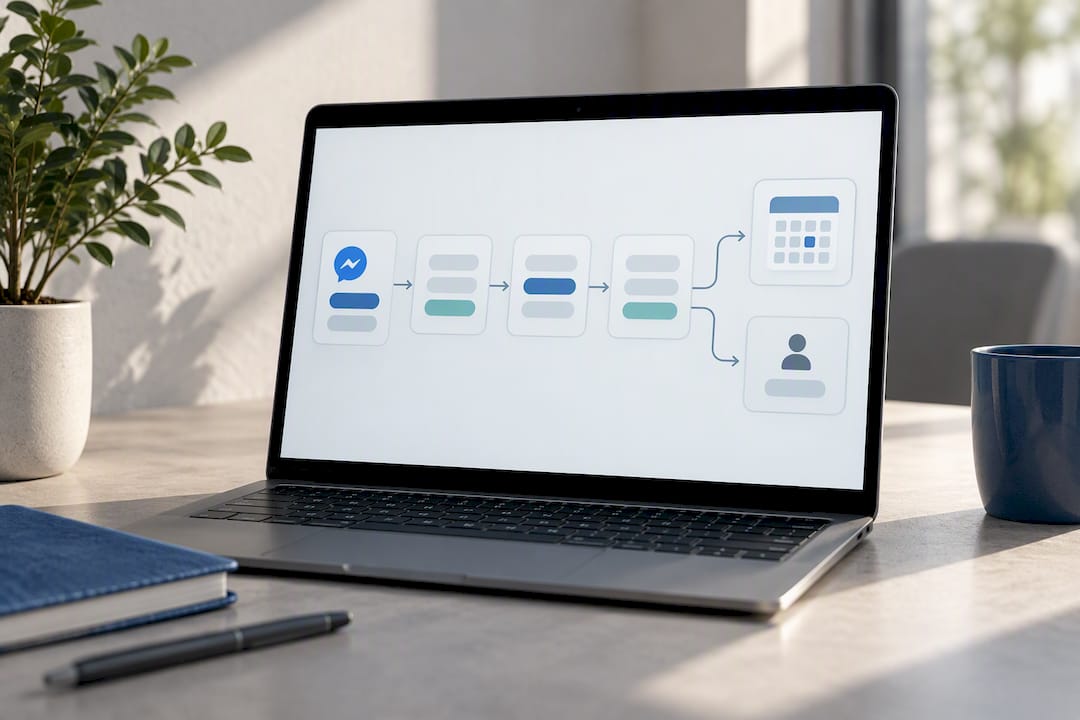
Behind the scenes, tag each response as a custom field. Someone who selects "full replacement" and "roof is 20+ years old" should get tagged differently than someone asking about a minor repair, so your follow-up messaging and your sales team's priority list reflect that difference automatically. This is the same segmentation logic covered in lead qualification automation for service businesses.
Automated nurture doesn't stop at the first message. A typical cadence looks like this:
- Immediate: confirmation message plus qualification questions.
- 1 hour later (if no reply): a friendly nudge, "Still there? Happy to answer any questions."
- 24 hours later (if still unqualified or unbooked): a value-add message, like a helpful tip or a limited-time offer.
- 72 hours later: final follow-up before the lead moves to a longer-term email or SMS sequence.
Set clear handoff rules: any lead who answers "ready to book" or requests pricing on a high-ticket service should escalate to a human immediately, with an SLA no longer than 15 minutes during business hours.
Pro Tip: Build one quick-reply option into every qualification question that says "Talk to a person now." Some leads want automation to move fast, but a visible human option reduces drop-off from people who distrust chatbots.
Routing Messenger Leads So None Get Lost
A lead sitting unanswered in your page inbox for six hours is functionally a lead you lost, even though it technically arrived. Routing infrastructure is what separates a Messenger campaign that converts from one that just generates chat noise.
Most small teams start with native partner integrations available directly inside Ads Manager's lead nurturing settings, which push completed conversations into common CRMs without custom code. Growing teams outgrow this fairly quickly and move to webhook-based routing, where every new Messenger message triggers an automation that posts a structured JSON payload, complete with timestamp, source ad, and qualification tags, to your intake endpoint or CRM API. Zapier's documentation on creating a lead from a social message and notifying an intake endpoint shows this pattern in practice, and its broader library of Facebook Pages integrations covers several prebuilt variations worth testing.
Whichever method you choose, monitor for delay. A few habits worth building in from day one:
- Set an internal SLA (15 minutes during business hours is a reasonable target for high-intent leads).
- Log a timestamp on every inbound message so you can measure actual response time, not assumed response time.
- Flag any lead unanswered for more than your SLA window so it surfaces before it goes cold.
- Review routing logs weekly for the first month; broken field mappings usually surface fast but silently.
Small teams can often run this manually with alerts and a single Zapier flow. Larger operations tend to need a dedicated routing layer that can triage by lead score, service line, or territory before a lead ever hits a rep's queue.
What to Measure and What Good Performance Looks Like
Three numbers tell you almost everything about a Messenger lead campaign's health: cost per lead (CPL), conversion-to-booking rate, and time-to-first-response. Track all three together, because a low CPL with a slow response time just means you're generating cheap, wasted leads.
Chat-driven Messenger campaigns have measured a noticeable decrease in average cost-per-lead compared with traditional lead-form campaigns, while holding conversion rates steady, according to agency testing reported by Search Engine Journal. The same source notes lower average CPMs on chat-driven campaigns as a contributing factor.
That figure is a benchmark, not a guarantee. Your actual CPL depends on industry, creative quality, and how tightly your qualification flow filters out poor-fit leads before they ever reach a human. Compare your own campaign's CPL against your historical lead-form CPL for a fair before-and-after read, rather than against an industry-wide number.
For attribution, export every completed conversation with its source ad ID intact, and tie it to whatever appointment or sale eventually closes. Most CRMs can hold this connection if you map the fields correctly at setup, which is why the export step in your Message Template matters as much as the copy inside it. A practical internal SLA to adopt: review response-time data weekly, and treat any lead answered outside 15 minutes as a process failure worth investigating, not just an outlier. The 10 minute SLA framework for CRM lead tracking gives a workable model for setting and enforcing that standard.
Writing Messenger Copy That Actually Converts
A robotic-sounding bot is the fastest way to kill a Messenger lead flow. Prospects can tell within one exchange whether they're talking to something that understands them or something reading from a script, and they abandon the thread accordingly.
Write every message the way you'd actually talk to a customer standing at your counter. Skip corporate phrasing like "We appreciate your inquiry" in favor of something closer to "Hey! Thanks for reaching out. What's going on with your project?" Practitioner guidance consistently points out that few businesses actually write this way, which makes it one of the easier, higher-leverage fixes available.
A few rules worth following in every flow:
- Default to quick-reply buttons over open text fields wherever the answer fits a short list of options.
- Pull in dynamic fields (first name, the specific service they clicked on) so the first message doesn't read like a mass broadcast.
- Segment broadcast messages by tag or past behavior instead of sending one blanket message to your entire contact list.
- Keep each message under two sentences; Messenger is a conversation, not an email.
Segmentation matters more than most marketers assume. A broadcast blasted to everyone who ever messaged your page, regardless of what they asked about, tends to produce high opt-outs and low engagement.
Pro Tip: Read your Message Template out loud before you launch it. If a line sounds stiff coming out of your own mouth, it will read as stiff to a stranger on the other end.
Your 10-Minute Launch Checklist
You don't need a perfect funnel to get your first Messenger leads flowing today. Here's the minimum viable setup:
- Pick one audience and one ad creative. Don't test five audiences on day one.
- Build a three-question Message Template with quick-reply buttons only, no open text.
- Preview the flow yourself and send one test message from a personal account.
- Connect a partner app or a single Zapier webhook, and map at minimum: name, phone number, and the qualifying answer.
- Launch with a modest daily budget and check your inbox within the first hour.
Before you consider it live, run these smoke tests: does the welcome message trigger instantly, does every quick-reply button lead somewhere, and does a completed conversation actually appear in your CRM or spreadsheet within a minute or two? If any of those three fail, fix it before spending another dollar on the ad. The step-by-step Messenger automation launch guide covers this same sequence in more detail if you want a second pass.
Why Missed Messenger Leads Are a Bigger Problem Than They Look
A message sitting unanswered overnight feels minor, but multiply it across every ad you run and it adds up to real, quiet revenue leakage. Most business owners never see the leads they lost, because a lead who doesn't hear back rarely complains. They just message your competitor instead.
This is the exact gap AI Peak Biz was built to close. Instead of leaving Messenger as one more inbox someone checks "when they get a chance," our platform pulls Messenger into a single unified inbox alongside SMS, web chat, email, Instagram, and Google Business Profile messages, and answers with AI around the clock so conversations do not have to wait until morning.
A few ways this shows up in practice:
- Incoming Messenger leads get an instant, conversational response, not a delayed one, even outside business hours.
- Qualification happens automatically, so the human on your team only steps in once a lead is worth their time.
- Every conversation, regardless of channel, lands in the same pipeline for tracking and follow-up.
- Onboarding is hands-on, not a self-serve software drop, so your qualification flow actually gets built correctly the first time.
For a business already running Message ads, this closes the exact routing gap covered above, without asking you to manage another disconnected tool.
When Messenger Deserves the Lead in Your Channel Mix
Messenger earns priority for businesses where speed and conversation beat a polished landing page. Local services, appointment-driven businesses, and limited-time offers all fit this pattern because the prospect wants a quick answer, not a research project.
A landing page or longer funnel still wins when your offer needs education before someone will convert, think financial products or complex B2B services where a single chat message can't carry enough context. In those cases, Messenger works better as a supplement for retargeting warm visitors than as the primary entry point.
Don't kill your landing page funnel before you have real comparative data.
Get Messenger Leads Answered, Day or Night
Running the campaign is only half the job. The other half is making sure leads who message you get answered fast enough to actually book, whether that happens at 2 PM or 2 AM. AI Peak Biz is built specifically for local service businesses that can't staff a round-the-clock front desk but still lose real revenue every time a message sits unanswered overnight.
AI Peak Biz answers Messenger conversations fast with AI, qualifies each lead using the same kind of quick-question flow covered above, and books the appointment directly, all inside one unified inbox alongside your SMS, email, and web chat. Instead of stitching together an ad platform, a chatbot tool, and a separate CRM, you get one system with hands-on onboarding to set your flows up correctly from day one. Plans start with the AI Website package at $197 per month, scaling up through Base Camp, Ascent, and Summit as your lead volume grows. Businesses with variable call and messaging volume also pay a phone and AI usage fee, priced on request. If you're already running Messenger ads and want the routing and response handled for you, see how AI Peak Biz's plans fit your business and get your unified inbox running this week.
Meta Docs and Guides Worth Bookmarking
A handful of sources back most of the setup steps and benchmarks covered above, and they're worth revisiting as Meta updates its tools. Meta's own Ads Manager lead nurturing help page documents the Message Template builder and partner app selection directly.
For deeper tactical reading, Search Engine Journal's breakdown of Messenger lead generation covers the CPL benchmark data in more depth, Social Media Examiner's Messenger marketing tips offers practitioner-level copy guidance, and Zapier's Facebook Pages integration library shows prebuilt routing automations you can adapt without writing code.
Messenger Deserves More Respect Than It Gets
Most marketing teams treat Messenger as an afterthought bolted onto a Facebook ad account, something IT or social media handles, rather than a real lead channel with its own rules. That's backwards. The conversational format is the advantage, not a technical quirk to route around.
The conventional wisdom says forms are safer because they're structured and predictable. In practice, the friction of a form is exactly what costs you leads who would have engaged in a real conversation. The businesses winning with Messenger right now aren't the ones with the biggest ad budgets. They're the ones who treat every chat thread with the same urgency as a ringing phone, because that's functionally what it is.
Where I'd push back on the standard advice: don't over-invest in building an elaborate, branching bot flow before you've proven the basics work. A three-question qualification sequence with fast human handoff will outperform a twelve-step automated maze every time, because the goal isn't to replace the conversation, it's to get to the right human fast. Complexity is not the same thing as sophistication here.
The businesses that actually win with Messenger treat speed as the entire strategy. Everything else, creative, targeting, copy, is secondary to whether someone gets an answer in minutes instead of hours.
Sources
- Running Meta ads but still chasing leads manually (video)
- 7 Facebook Messenger marketing tips from the pros (Social Media Examiner)
- How Facebook Messenger generates cost-effective, trackable leads (Search Engine Journal)
- Create lead from social message and notify intake endpoint (Zapier)
Recommended
- Launch Facebook Messenger Automation in 10 Minutes for SMBs
- Multichannel Messaging for Small Service Businesses
- Speed to Lead: Why Responding in 5 Minutes Wins the Job
FAQ
What Does "Lead" Mean on Facebook Messenger?
A Messenger lead is anyone who starts a conversation with your business page, usually by clicking a Message ad, tapping a Send Message button, or replying to a comment prompt. Unlike a form lead, a Messenger lead has already engaged in a live exchange, which is why qualification can happen inside the chat itself.
Where Do I Find My Leads on Facebook?
Completed Messenger conversations show up in your page inbox inside Meta Business Suite, but for campaign tracking you should export leads through the Message Template's partner app or webhook connection set up in Ads Manager. Relying on the inbox alone makes it easy to lose track of volume and response time as your campaigns scale.
Why Is Meta Making Changes to Messenger Business Features?
Meta periodically adjusts Messenger's business tools and messaging policies rather than shutting the platform down, often to tighten spam controls or shift emphasis toward newer formats like Click-to-Messenger ads and automated templates. Businesses should treat any policy update as a reason to review their Message Template and integrations, not assume the channel is going away.
Can You Tell if Someone Is Checking Your Messenger Business Messages?
Messenger shows read receipts and "seen" indicators within a conversation, but a business can't see broader activity like whether someone reopened the app without responding. For lead tracking purposes, focus on measurable signals such as message opens, quick-reply clicks, and time-to-response instead.
Does AI Peak Biz Work With Facebook Messenger Leads?
Yes. AI Peak Biz includes Facebook Messenger inside its unified inbox, so leads generated through Message ads get a fast AI response, automated qualification, and appointment booking around the clock. Current plan pricing, including the AI Website plan starting at $197 per month, is listed on the AI Peak Biz site.